

Portrait retouching is an essential step of modern photography. This guide introduces the 5 best portrait retouching software options for photographers on Windows, helping you choose the right tools to enhance and perfect your images.
Many photographers spend countless hours shooting and retouching portraits to achieve a flawless result. To improve editing efficiency and show a polished look, choosing the right editing tool is essential. This post introduces the 5 best portrait retouching software to make your image perfect.
What Is Portrait Retouching
Portrait retouching is the process of enhancing and refining the appearance of a subject in images to achieve natural and polished results. It is not only about simply editing the flaws, such as removing blemishes, correcting skin imperfections, but also about improving the overall facial features, such as smoothing skin, adjusting brightness, and more.
5 Best Portrait Retouching Software
Choosing the right portrait retouching software can make a big difference in achieving perfect results for photographers. This section will explore 5 of the best portrait retouching software options available to help you make an informed decision.
Photoshop
Adobe Photoshop is one of the most powerful and widely used photo editing software programs in the industry.
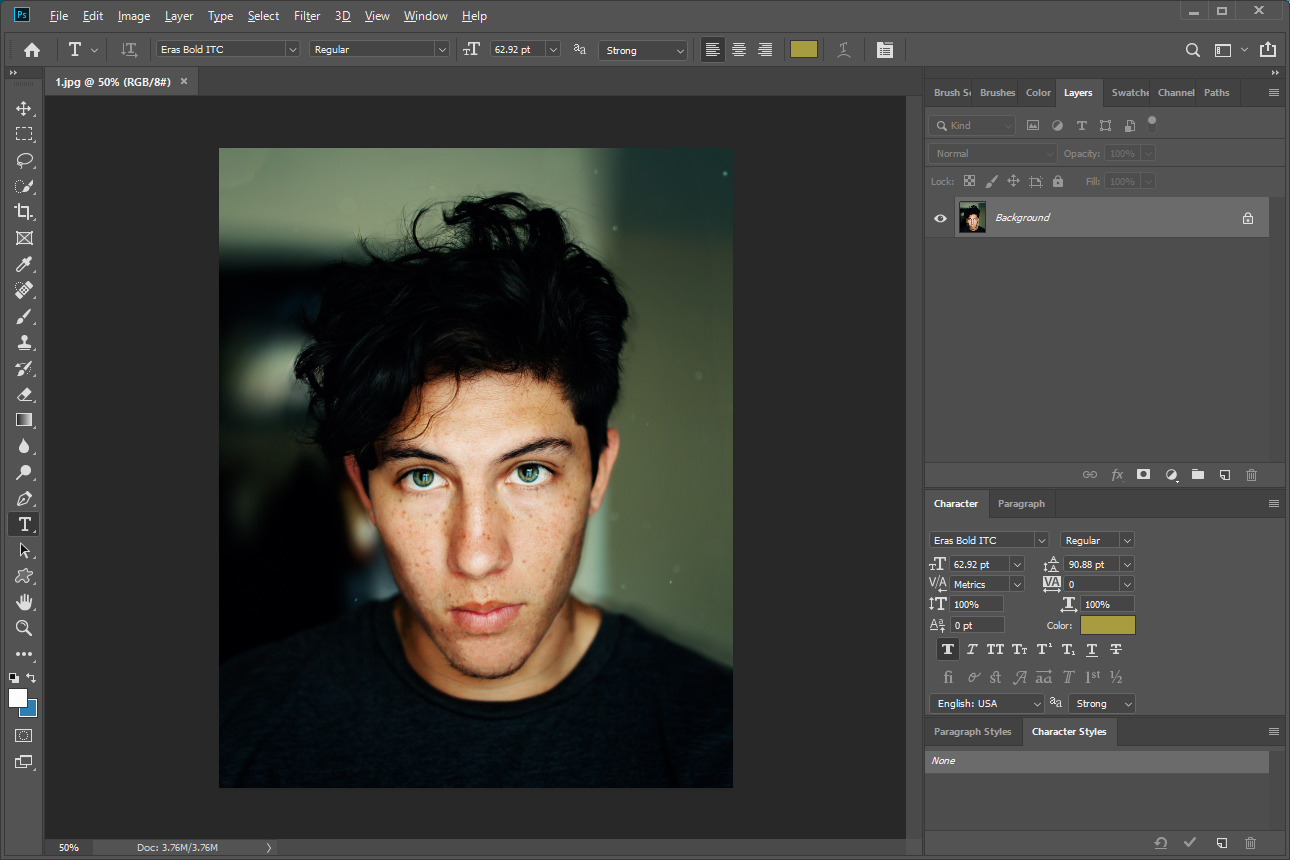
For portrait retouching, Photoshop comes swinging with a massive collection of tools to help you edit. For example, the Patch tool can remove greater details. The Clone Stamp tool can soften wrinkles, remove unwanted shadows, and more. The Liquify Filter tool can adjust the facial shape and ratio to make the face look more perfect. Besides, its advanced layer-based editing system and AI-powered Neural Filters allow you to fine-tune facial expressions, lighting, and skin textures while maintaining natural results.
No matter whether you are editing professional headshots or enhancing casual portraits, Photoshop is the top choice for both photographers and amateurs.
Lightroom
Lightroom is well-known for its streamlined workflow and a range of effective tools for portrait retouching. With the customized presets, you can improve efficiency when editing a set of images. For retouching portraits, you can use the Clone, Spot Removal, and Content-aware Remove tools to fix blemishes. Besides, it enables you to adjust facial skin tones, lip and eye color, beard, and more features.
Moreover, Lightroom also offers easy-to-use sliders like Exposure, Clarity, Vibrance, and Saturation to enhance images. It also provides AI-based masking tools to enhance specific facial features to achieve a natural-looking portrait. All in all, Lightroom is an ideal option for studio and event photographers.
PortraitPro
If you are new to retouching portraits, PortraitPro is the most suitable photo editor to start, as it offers an intuitive interface and provides built-in tutorials.
PortraitPro uses intelligent facial-detection technology that automatically identifies features such as skin, eyes, lips, and hair. Then, it provides simple sliders and controls for portrait adjustments, which allow you to achieve quick edits. Besides, as a specialized portrait editor, it offers AI features for automatic adjustments, such as removing blemishes, smoothing skin, and more.
In short, PortraitPro’s streamlined workflow makes it especially useful for photographers who want fast, professional retouching with minimal manual editing.
Luminar Neo
Luminar Neo is considered one of the most innovative AI-powered photo editors. Built with advanced technology, it delivers fast performance and exceptional flexibility for both beginners and professional photographers. Besides, it comes equipped with a wide variety of portrait enhancement tools, including slimming face, removing shine, smoothing skin, and more.
Beyond its portrait features, Luminar Neo provides intuitive editing tools with straightforward sliders and one-click presets, enabling you to apply advanced adjustments without requiring extensive technical skills. In addition, Luminar Neo supports batch editing, making it efficient for photographers who need to edit large sets of images.
In a word, Luminar Neo excels at producing clean, natural enhancements with minimal effort, making it ideal for photographers who want high-quality results in a time-efficient workflow.
ON1 Portrait AI
As a standalone version of the portrait enhancement tools in ON1 Photo RAW 2023, ON1 Portrait AI focuses on automated and intelligent portrait editing.
ON1 Portrait AI will automatically detect faces in photos and offer the enhancement options you would like to use. It features AI-based skin smoothing, blemish removal, eye and mouth enhancement, and detailed control over texture and color. You can fine-tune each adjustment manually for precise results. For example, to whiten teeth, the software will identify and mask mouths automatically, and the panel on the right will offer sliders to adjust it.
In conclusion, ON1 Portrait AI’s batch-processing capabilities and fast performance make it a great choice for portrait photographers working with large image sets.
Conclusion
Choosing the right editing tool can significantly elevate your workflow and the final quality of your images. This post introduces the 5 best portrait retouching software. Each option offers unique features designed to refine skin tones, enhance facial details, and create natural-looking portraits. Select the photo editor that fits your needs and produce portrait images that stand out!
User Comments :