

Can you create an exclusive passport photo for your pets? This post recommends three reliable pet passport photo generators to help you, including EaseMate AI, FlexClip, and LogoAI.com.
Have you ever been curious about what your cat or dog will look like in a passport photo? Want to try this creative idea? With various expert pet passport photo generators on the market, turning your pet into a passport photo is easy to accomplish. I’ve tried many of them and picked up three easy-to-use and reliable ones. Let’s dive in now!
Pet Passport Photo Generator 1: EaseMate AI
EaseMate AI is a professional image generator supported by browsers. It has an intuitive user interface and can turn pet into a passport photo with just a few clicks. Also, EaseMate AI lets you adjust the output photo aspect ratio to suit different uses. More than that, EaseMate AI can also serve as an image converter, face swapper, clothes changer, watermark remover, background changer/remover, etc.
Now, follow the step-by-step guide below to create a passport photo for your pet.
Step 1. Access EaseMate AI
Go to EaseMate AI’s pet passport generator. (Visit https://www.easemate.ai/pet-passport-photo-generator).
Step 2. Upload Your Pet Photo
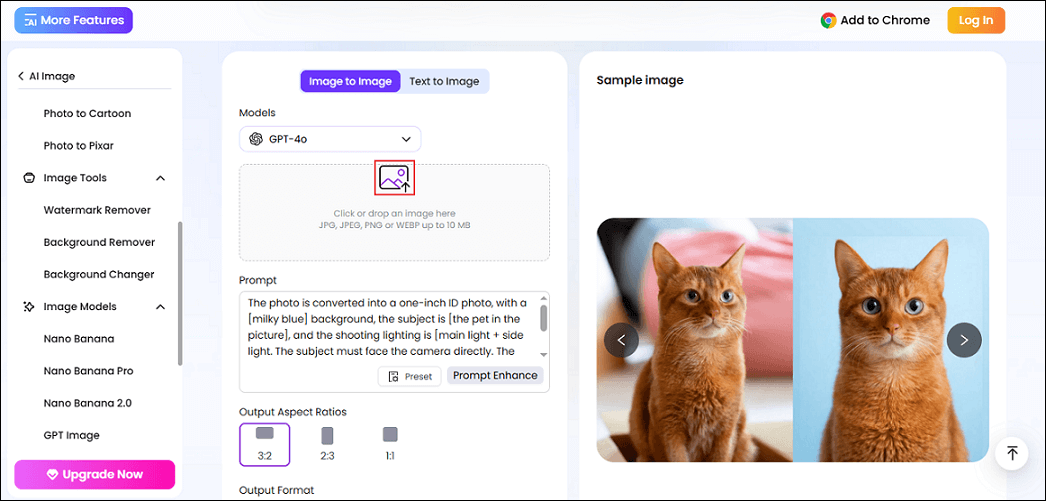
Click the Photo icon to upload the target pet photo.
Step 3. Choose Output Photo Aspect Ratio
There are three aspect ratios: 3:2, 2:3, and 1:1. Choose the one you prefer.
Step 4. Generate Pet Passport Photo
Click the Generate button to start generating your pet’s passport photo.
Step 5. Download the Photo
Click the Download icon next to the generated passport photo to save it.
Pet Passport Photo Generator 2: FlexClip
FlexClip is an AI-powered image generator that reimagines your pet photos, transforming them into stunning portraits in various artistic styles by applying preset art filters. With its high performance, FlexClip can efficiently transform your pet photos into passport photos. Enter the prompt, and your pet passport photo will be done in seconds. Follow the instructions below.
Step 1. Enter FlexClip
Navigate to FlexClip’s photo generator. (Visit https://www.flexclip.com/ai/photo-editor/).
Step 2. Upload Your Photo
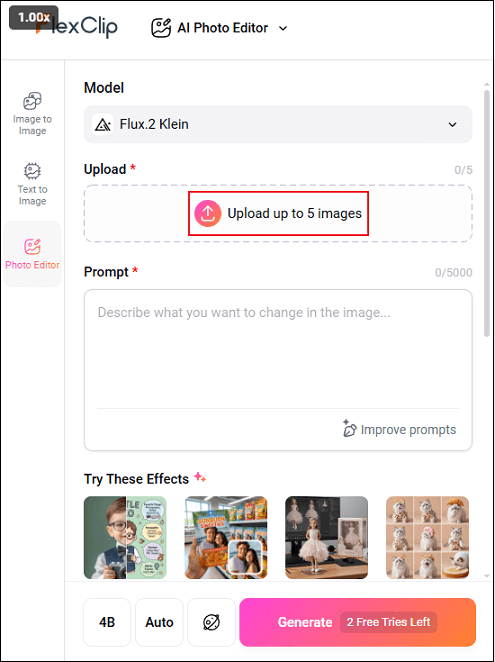
Click the Upload up to 5 images option to import your pet’s photo.
Step 3. Input Prompt
Input “turn my cat into a passport portrait” into the Prompt box.
Step 4. Generate Your Pet Photo to Passport Style
Click the Generate button to start generating a passport picture.
Step 5. Download the Picture
When the generating process completes, click the Download button in the bottom-right corner to save the pet passport picture.
Pet Passport Photo Generator 3: LogoAI.com
LogoAI.com is a powerful image designer that helps you create pet passport photos quickly and easily. It supports multiple formats, including PNG, JPG, PDF, and SVG, meeting different requirements. In addition, LogoAI.com can also apply human effects in pet photos, making a dog dance in a video, convert a photo to watercolor style, etc.
Now, follow the guide below to create a passport photo for your pet.
Step 1. Go to LogoAI.com
Access LogoAI.com’s pet passport photo generator. (Visit https://www.logoai.com/design/pet-passport-photo).
Step 2. Upload Your Photo
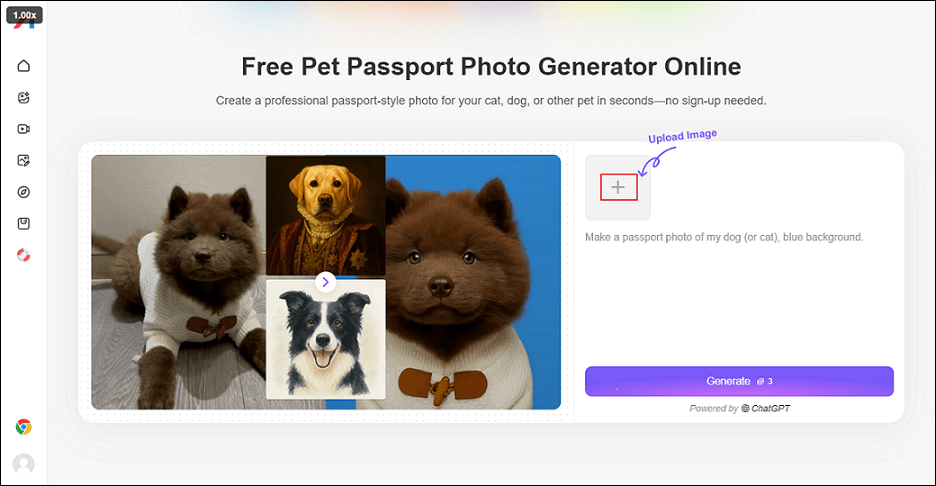
Click the + icon to upload the target photo.
Step 3. Start Creating a Passport Photo
Click the Generate button to start creating a pet passport photo.
Step 4. Download the Photo
Click the Download icon on the generated photo to save it.
That’s all!
Bonus: Merge Photos into a Video
Want to turn your pet photos into a stunning video? Don’t hesitate to try MiniTool MovieMaker! It is a powerful and versatile desktop video editing program designed for Windows users. You can import photos into the video editor and then arrange or crop them, add music, transitions, stickers, effects, etc., to make the video more engaging. Then, your photos can be shown like presentation sliders in a creative way.
In addition, MiniTool MovieMaker features advanced editing, such as multi-track editing, high-resolution editing, copy and paste on the timeline, photo collage, etc. Simply click the download button below to give it a try!
MiniTool MovieMakerClick to Download100%Clean & Safe
In Summary
This post provides three professional and easy-to-use pet passport photo generators to create exclusive passport photos for your beloved pets. With the tools mentioned above, you can turn your ideas into reality!
User Comments :