

What Is Claymation
Clay animation, also known as plasticine animation, is a form of stop-motion animation. For over a century, generations of youngsters have been captivated by the intriguing technique of blending stop-motion animation with clay models. One of the most famous Claymation series, Shaun the Sheep, enjoys immense popularity worldwide. This animated series has proven the viability of clay animation on television.
Are there any methods to convert photo to Claymation style? Yes, there are! Converting your pictures to a Claymation style unleashes creativity and creates a unique visual appeal. The content below provides three reliable methods.
Convert Photo to Claymation Style with EaseMate AI
EaseMate AI is an AI-powered online image converter that offers various image styles, including Clay, Lego, illustration, watercolor, etc. With a great performance, this AI tool empowers you to convert pictures to high-quality, watermark-free Claymation style. Follow the instructions below to generate your Claymation-style photo.
1. Access EaseMate AI’s Claymation Generator
Visit https://www.easemate.ai/webapp/chat?from=ai-photo-generator.
2. Upload Your Photo
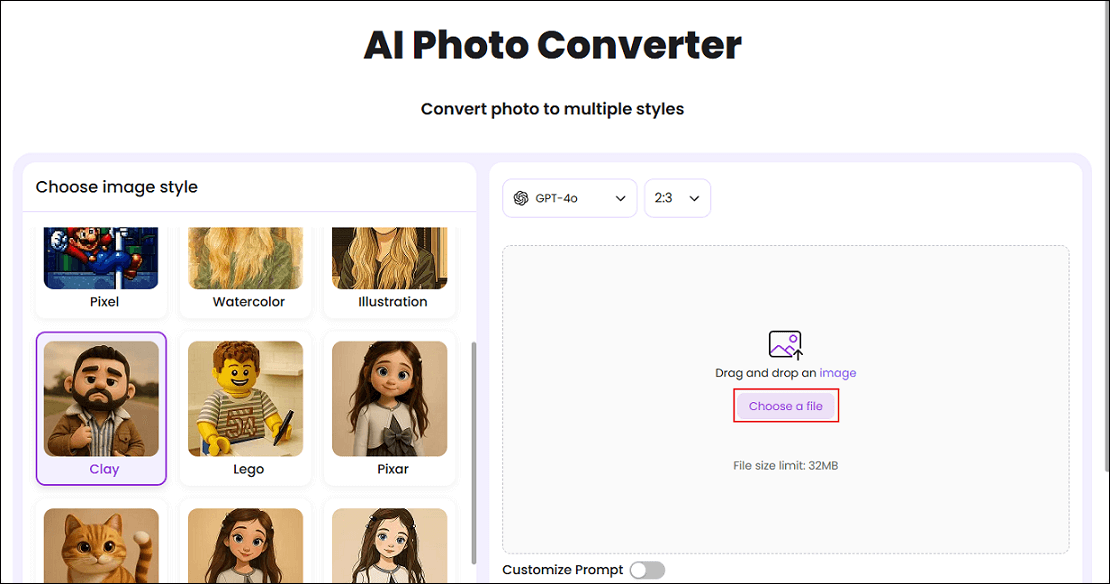
Click the Choose a file option to import your photo.
3. Choose the Clay Style
There are multiple image styles in the left section. Choose Clay.
4. Download the Claymation-Style Image
When the generating process completes, click the Download option to save the picture.
Convert Photo to Claymation Style with FlexClip
FlexClip is an online and professional image generator. It uses advanced technology to analyze your pictures and turn them into a Claymation project in no time. The converted images are strikingly lifelike, maintaining high similarity to the original artwork while possessing a distinctive Claymation style, highly favored by people. Importantly, FlexClip features a straightforward user interface, bringing an effortless and smooth experience. Just follow the details below to turn photo into Claymation style.
1. Go to FlexClip’s Photo Generator
Visit https://www.flexclip.com/tools/photo-to-claymation/.
2. Upload Your Picture
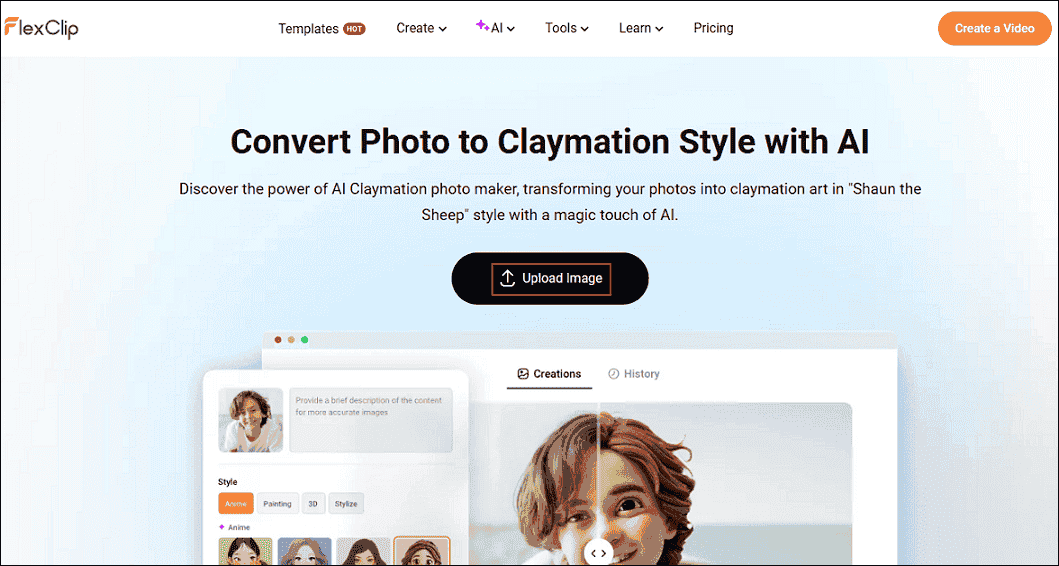
Click the Upload Image button to add the picture you want to convert.
3. Select the Target Photo Style and Generate
In the Anime section of the style list, choose Claymation 1 and click Generate.
4. Download the Image
When the photo is converted to Claymation style, click the Download option to save the photo to the local folder.
Convert Photo to Claymation Style with insMind
insMind is a user-friendly AI image editor that comes with various functions, such as converting a photo to Claymation, cartoon, and watercolor; removing background; upscaling pictures; batch processing; and more. With insMind, a clay effect can be added to your photos in just seconds, without any effort. Whether it’s self-portraits, treasured group images, or even snaps of your furry friends, converting them into captivating clay artworks is a breeze.
Here’s how to convert photo to Claymation style using insMind.
1. Go to insMind’s AI Clay Filter
Visit https://www.insmind.com/ai-clay-filter/.
2. Upload Your Picture
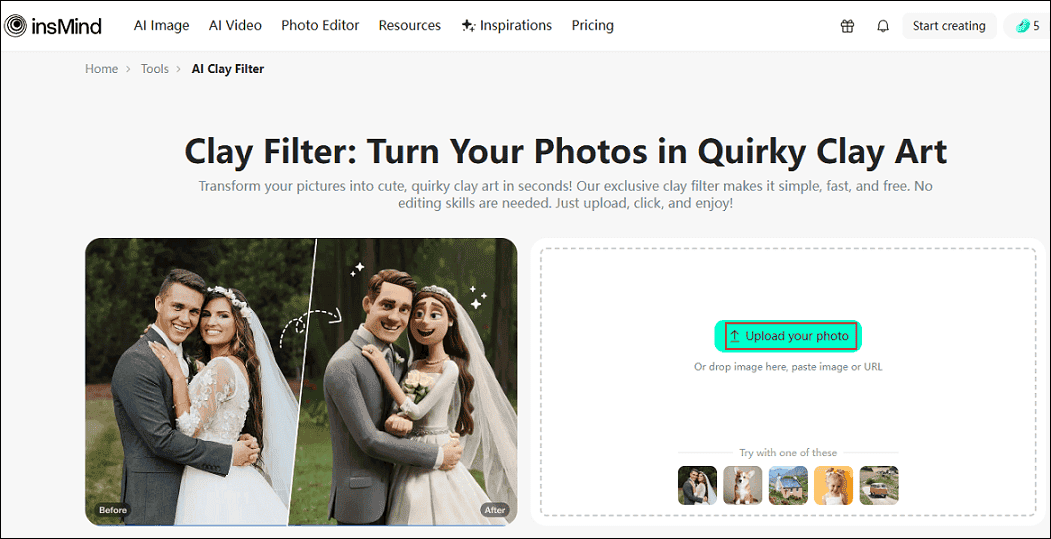
Click the Upload your photo button to add your picture.
3. Choose the Clay Style and Generate the Photo
In the right section, choose the Clay option and click Generate.
4. Download the Photo
When the photo is ready, click the Download Standard option to save your Claymation-style photo.
That’s all! With the three Claymation picture generators above, you can convert a photo to Claymation with ease.
Bonus: How to Convert Images to a Video
Looking for methods to turn your memory pictures into a video? MiniTool MovieMaker deserves a try! It is a powerful and free video editor, empowering you to make a video with your precious pictures effortlessly. How to edit a GIF? MiniTool MovieMaker also offers a quick solution! It supports various formats, like GIF, PNG, JPG, MP4, MOV, MP3, and more. Moreover, MiniTool MovieMaker provides high-quality outputs and has no ads, bundles, or watermarks, trying its best to meet your requirements.
Click the download button below to give it a try!
MiniTool MovieMakerClick to Download100%Clean & Safe
In Summary
This post offers three professional and reliable image editors to help you convert photo to Claymation style easily and quickly. Pick the one you prefer and start generating your Claymation pictures!
User Comments :