

Mukbang videos are taking the internet by storm. Do you also want to create your own eating videos, post them on social media, and get amazing view counts? How to make Mukbang videos? This post will guide you through the whole process of making Mukbang videos and editing them with the best video editor – MiniTool MovieMaker.
Mukbang videos aren’t just watched by food enthusiasts; many ordinary people also enjoy them to alleviate loneliness or satisfy their appetite. Especially for people who are trying to lose weight, watching Mukbang videos can help curb cravings and aid in weight loss. Are you confused about what exactly Mukbang videos are and why they’ve become one of YouTube’s hottest topics? How to make Mukbang videos? This post has all what you want. Read on.
What Is Mukbang Video
Mukbang video is a style of livestreaming that originated in South Korea, in which hosts eat massive amounts of food while engaging with viewers. It blends eating with entertainment, ASMR noises, and social interaction, frequently meeting people’s needs for food, companionship, or satisfaction. This type of live-streaming format became popular in South Korea in the early 2010s and spread globally beginning in the mid-2010s. Streamers eat a broad array of food in front of the camera, including pizza, noodles, fried chicken, candies, and more.
Beyond live streaming, Mukbang content can also be pre-recorded and published across major online platforms, such as YouTube, TikTok, and Instagram. Mukbang hosts from around the world have gained significant popularity on numerous social media sites, establishing Mukbang as a potentially lucrative career path for young people in Korea and globally. By enjoying food in front of the camera, live-streaming food broadcasters can generate income through advertising, sponsorships, endorsements, and the viewership they attract.
As the number of singles and people living alone grows, they increasingly turn to Mukbang videos for companionship during meals. However, this may not stem from the loneliness of eating alone, but rather from the pleasure of watching others eat and sharing food with others.

Why Are Mukbang Videos So Popular
The most intriguing question is: Why have Mukbang videos become so wildly popular? Is watching others eat really that entertaining? In this section, let’s discuss why Mukbang videos are so popular.
The most compelling reason why Mukbang videos have captured such attention lies in the gluttonous behavior displayed by the hosts in their videos, or rather, the sheer volume of food they consume in videos. The majority of viewers find this quite interesting, even though some could consider it to be poor eating habits or food waste. For most people, watching others consume an amount of food that would be impossible for the average person to eat in one sitting – 10,000 to 20,000 calories – and do so with seemingly boundless energy is a form of entertainment.
Additionally, Mukbang streamers typically use microphones with excellent sound pickup to record chewing sounds. They often exaggerate the noises made while chewing food, enhancing viewers’ sense of relaxation and pleasure. As a result, many viewers choose to watch food vlogs before bed to fall asleep quickly.
Many Mukbang streamers typically go live during South Korea’s most popular mealtimes. This allows Koreans not only to watch livestreams but also to eat while doing so. This is especially appealing to people who live alone and would otherwise have no companionship at mealtime. Beyond South Korea, many viewers worldwide continue to enjoy watching these videos while eating.
Overall, the popularity of Mukbang videos stems from their fusion of social interaction, entertainment, and sensory pleasure. They meet the digital age’s craving for community, escapism, and vicarious experiences, as well as people’s desire for companionship and freedom from diet-related restraints.
Types of Mukbang Videos
Mukbang videos come in a wide variety, depending on their focus. In this section, I will introduce you to the three main types.
ASMR
ASMR, short for autonomous sensory meridian response, is a popular Mukbang video type. In these types of eating videos, the streamer focuses on the sounds made while eating, such as slurping, chewing, etc. These sounds create an atmosphere that makes viewers feel as though they can experience the streamer eating.
Food Challenge
Food challenge videos are a viral phenomenon online, where participants consume large quantities of unusual foods, experiment with extreme flavor combinations, or tackle bizarre eating challenges for entertainment – such as devouring 50 layers of a single food item in one sitting. These videos often incorporate competitive or humorous elements. To attract attention, food challenge videos showcase participants overeating or overcoming daunting food challenges.
Themed
Themed Mukbang videos usually showcase specific cuisines, such as Korean cuisine, seafood, and so on. It often combines food exploration with cultural discovery. While satisfying viewers’ appetites, it also promotes food culture.
How to Make Mukbang Videos
Watching other YouTube creators’ Mukbang videos is certainly enjoyable, but the real fun lies in making your own Mukbang videos. Do you want to make attractive Mukbang videos like a pro and gain a lot of likes? How to make Mukbang videos? The guide below will help you create Mukbang videos. Read on for more.
Step 1. Prepare Food
Food is the most important element in Mukbang videos. Before recording, decide what you’ll be eating – fried chicken, noodles, seafood, or other delicacies. Anyway, make sure the food will make the audience crave it. To make the video more visually appealing, use attractive tableware and arrange the food beautifully on the plate. This will make viewers want to keep watching.
Step 2. Get Filming Equipment
Video clarity is of utmost importance. To capture all the food, it’s best to use a camera equipped with a wide-angle lens capable of taking high-quality footage, which helps clearly showcase the food. Additionally, a proper microphone setup is crucial, allowing viewers to hear distinct chewing sounds for a more immersive experience.
Step 3. Set the Lightning
When filming videos, lighting is also crucial. It’s best to shoot in natural sunlight. If conditions don’t allow it, you can use appropriate lighting equipment, such as purchasing a ring light. Adjust the light’s position to ensure both the food and the people’s faces are clearly visible.
Step 4. Start Filming
Once all preparations are complete, you can begin shooting the video. While filming, you don’t need to stare at the camera the entire time while eating. Glance at the camera briefly when showcasing the food to keep your facial expressions natural and avoid appearing forced. Additionally, take larger bites while eating to enhance viewers’ sense of satisfaction, thereby increasing the video’s like count.
Step 5. Edit the Video
Raw Mukbang videos you filmed might be redundant. If you want to create a professional Mukbang video and increase the possibility of going viral, better edit your footage. To edit Mukbang videos, a great video editor can make the job much easier. MiniTool MovieMaker is just the one.
MiniTool MovieMaker is a powerful and free video editor that comes with various editing features. For basic editing, it can crop, trim, reverse, flip, rotate video, and control the speed. For advanced editing, this application supports high-resolution editing, multi-track editing, copy and paste on the timeline, photo collage, video text overlay, and more, trying its best to meet your requirements. It has an extensive resource library, allowing you to polish videos by adding transitions, effects, stickers, music, and more.
In addition, MiniTool MovieMaker offers high-quality outputs and allows you to configure output video parameters based on your needs, like resolution, frame rate, quality, etc. It features a straightforward user interface, enabling both beginners and professionals to complete their job with no effort. Furthermore, MiniTool MovieMaker has no ads, bundles, or watermarks, offering a joyful user experience.
How to make Mukbang videos with MiniTool MovieMaker? You can follow the guides.
1. Download and Install MiniTool MovieMaker
Click the download button below to download this program. Then, follow the setup instructions to install it on your computer.
MiniTool MovieMakerClick to Download100%Clean & Safe
2. Import Your Video
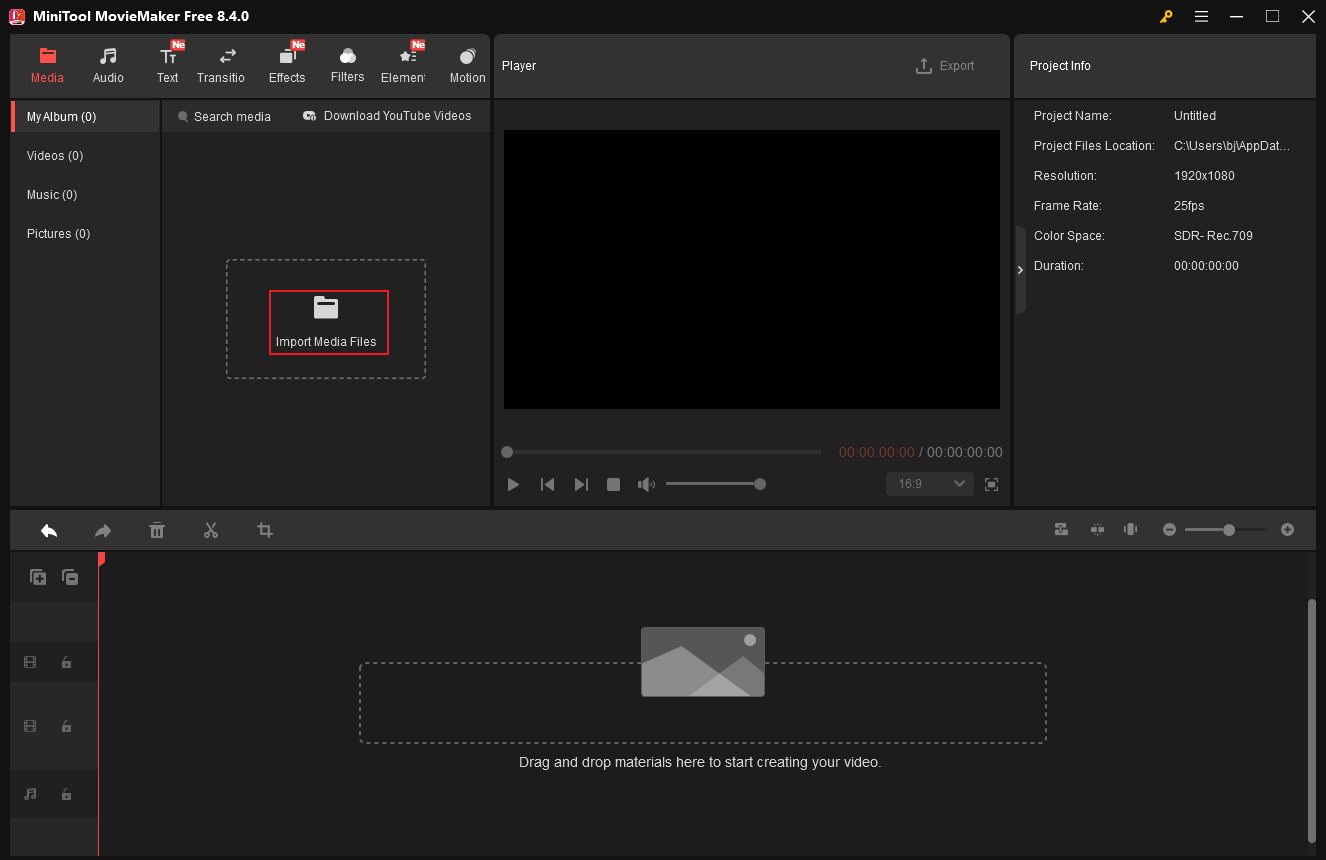
Launch the program and click the New Project option to enter the main editing page. Then, click the Import Media Files option to add your video.
3. Perform Basic Editing
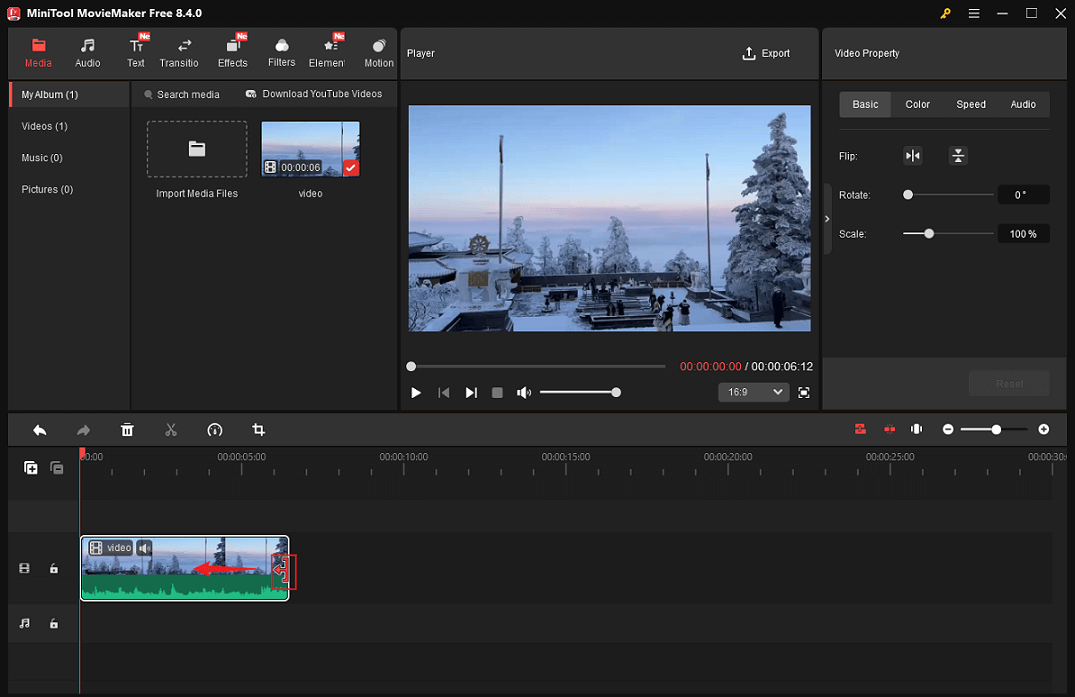
Drag the added video to the timeline.
Hover the mouse cursor over one of the two edges of the video layer until the Trim icon appears, then drag it inward to remove the unwanted portion of the video.
Split Video
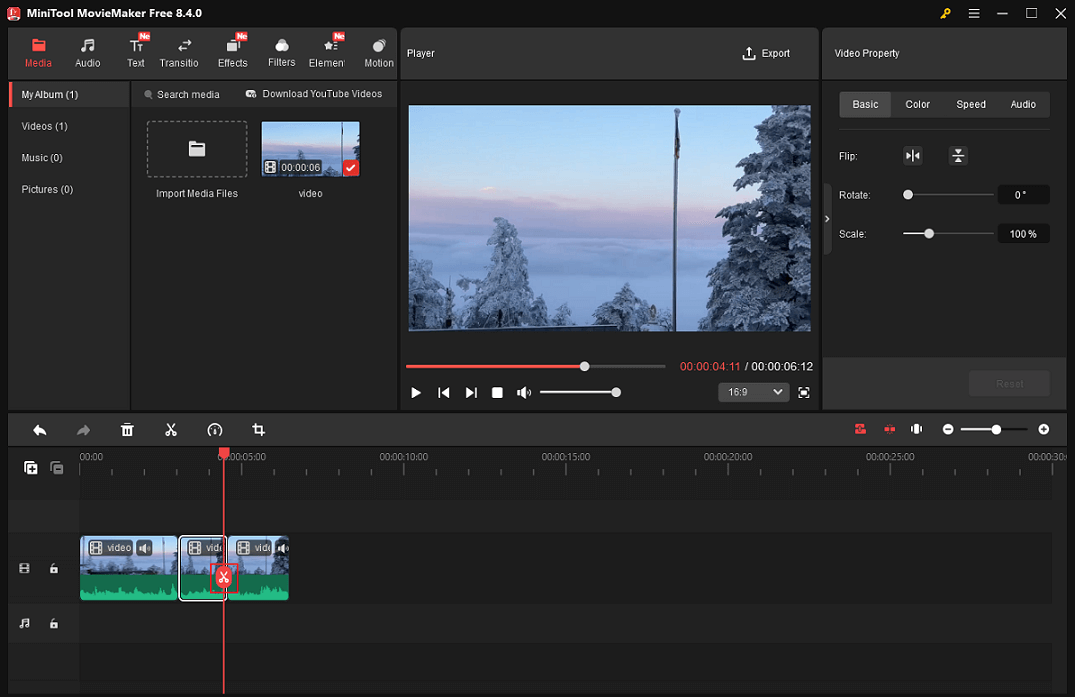
To remove the unwanted middle part of the video, drag the red playhead to the left of the undesired place and click the Scissors icon to cut the video into two parts. Then, move the red playhead to the right of the unwanted part and click the Scissors icon again so you can extract the unwanted clip. Next, right-click on the undesirable clip and click Delete to remove it. Continue doing this until all of the unwanted video clips are deleted.
Crop Video
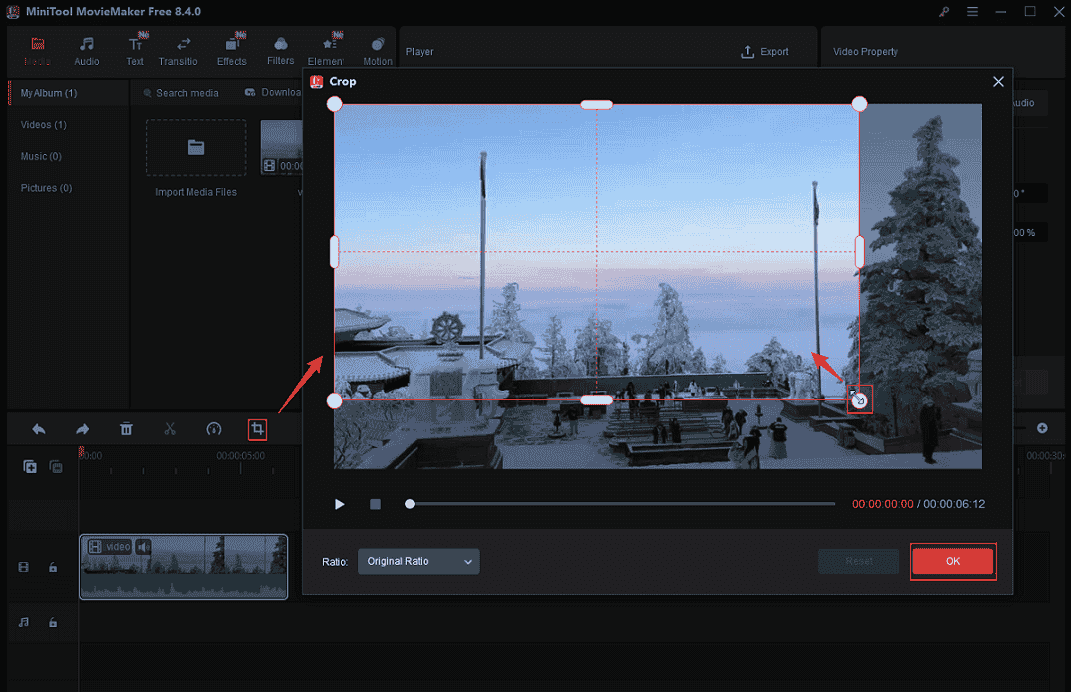
Click on the target video clip on the timeline and click the Crop icon in the toolbar above to enter the Crop window. There, drag the cropping handles inwards to crop the video. After that, click OK to save the changes.
4. Adjust Video Property
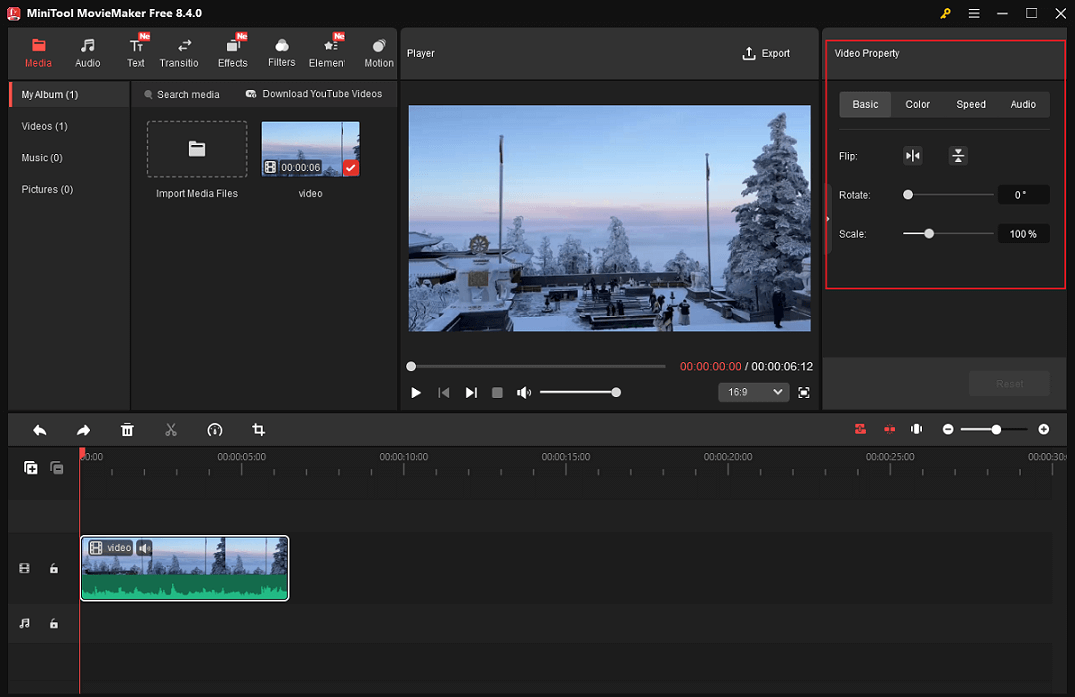
Click the video on the timeline to activate the Video Property window. In the top right Video Property section, you can flip, scale, rotate the video, and change video speed. Also, you can color correct the video by changing its contrast, saturation, and brightness. Change the audio volume or fade in/ out the audio based on your needs.
5. Polish Your Mukbang Video
To create an attractive and professional Mukbang video, accomplishing the above is far from sufficient. Let’s spice it up!
Add Stickers to the Video
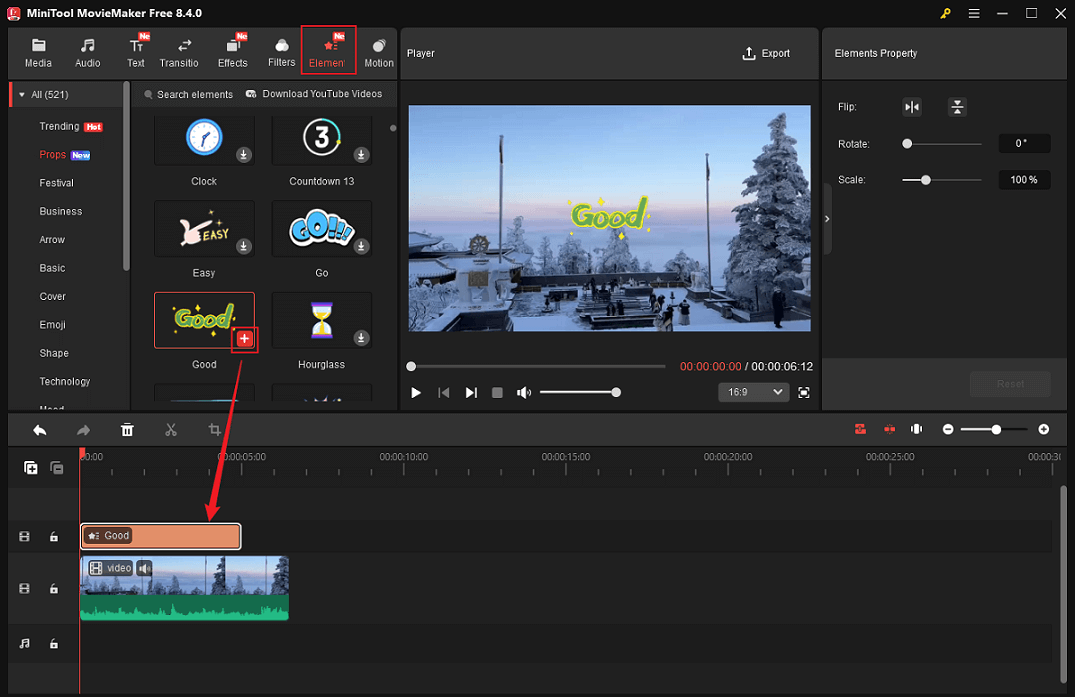
Go to the Elements section, download the stickers you like, and add them to the video. Drag the stickers on the timeline to change their duration in the video.
Add Background Music to the Video
Videos without music feel monotonous and boring, making them hard to watch. Therefore, better add background music to your Mukbang video. MiniTool MovieMaker provides two methods to do so.
- Add music from your local folder: Click the Import Media Files option in the Media section to add music from your own collection.
- Add music from the Audio library: Go to the Audio section. Next, download the music you prefer and add it to the audio track. Trim the audio based on your needs.
Add Text to the Video
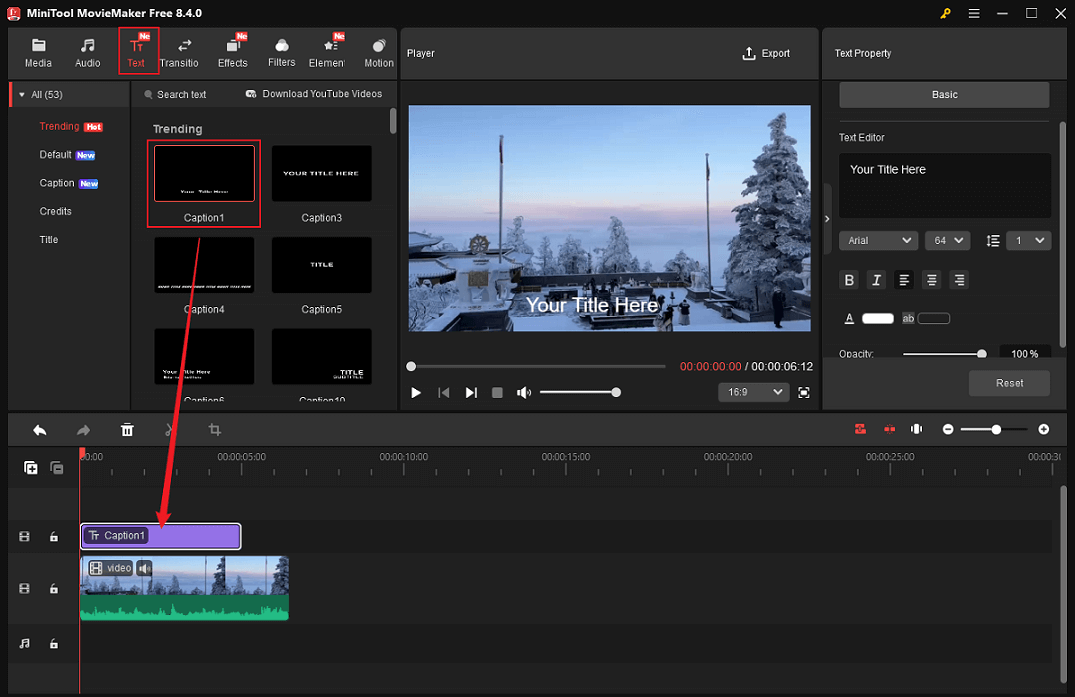
Head to the Text section, choose the desired text style, and click the plus icon to add it to the video. Next, drag the edges of the text layer on the timeline to adjust its playtime in the video. In the top right Text Property window, input the target text and customize text settings, like font, color, and size.
6. Export the Mukbang Video
Click the Export icon at the top right of the Player window to enter the Export window. Next, you can rename the Mukbang video, select a saving destination, and adjust the output format, resolution, and frame rate. After that, click the Export button to export the video.
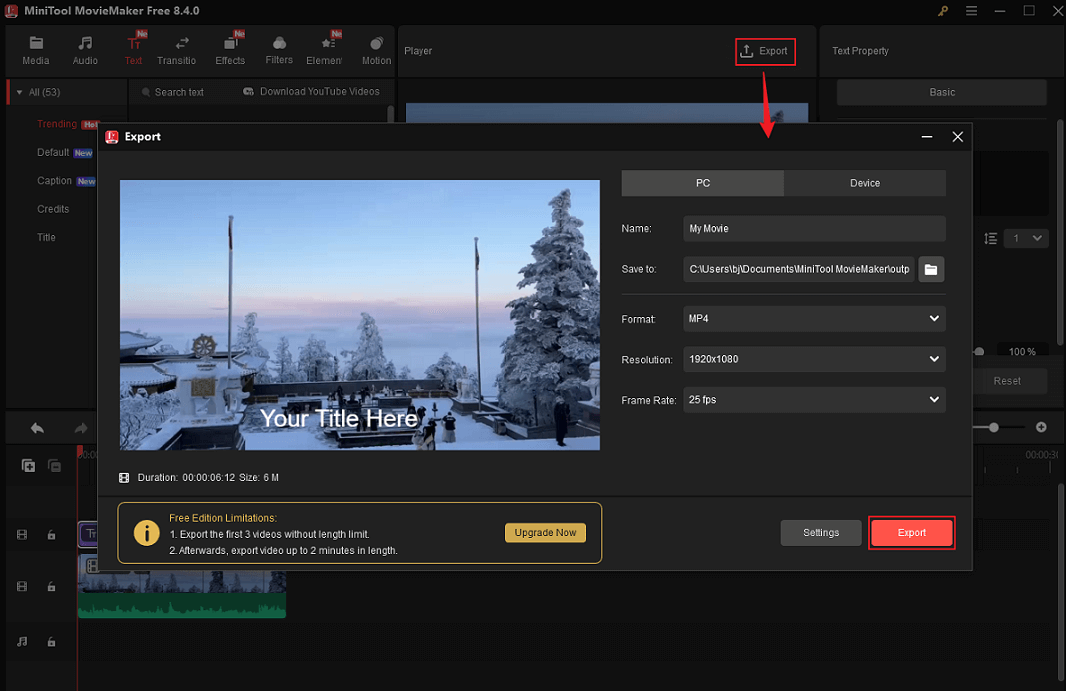
When the video exporting process completes, click the Find Target button to locate your Mukbang video in the local folder.
MiniTool MovieMaker is more than just a video/GIF editor; it also serves as a video compressor, file converter, media player, video/audio merger, and more. Click the download button to explore more!
MiniTool MovieMakerClick to Download100%Clean & Safe

In Summary
How to make Mukbang videos? This post introduces what a Mukbang video is, the reason why it is so popular, Mukbang video types, and how to make an engaging Mukbang video. To polish the video with ease, MiniTool MovieMaker can do you a big favor. Now, it’s your turn!
You can contact us via [email protected] if you have any questions about using MiniTool MovieMaker. Alternatively, you can send me messages directly on X, and I’ll help you as soon as I can.
User Comments :