

This post explains how to turn a photo into a line drawing using Photoshop, Fortor, and Photopea. Explore these line art generators and create unique art pieces in just a few clicks!
Sometimes, you may want to turn a photo into a line drawing for a clean, artistic look or to create unique content for social media. So, how to turn photo into line drawing art? This post offers 3 solutions for you.
How to Turn Photo into Line Drawing on Windows
Photoshop is a professional-grade image editing application developed by Adobe for Windows and Mac computers. Featuring a layer-based system, Photoshop allows for detailed edits on raster images and provides comprehensive tools. In addition, Photoshop is widely used in graphic design, digital painting, and drawing.
When it comes to transforming a photo into a line drawing, many people wonder how to complete this task with Photoshop. For entry-level users, this may sound like a difficult task. Actually, it’s much easier than you think.
Here’s how to turn a photo into a line drawing using Photoshop.
Step 1: Open Your Photo into the Line Art Generator
After opening Photoshop, click File > Open to open your target photo from your local storage.
Step 2: Apply the Find Edges Filter
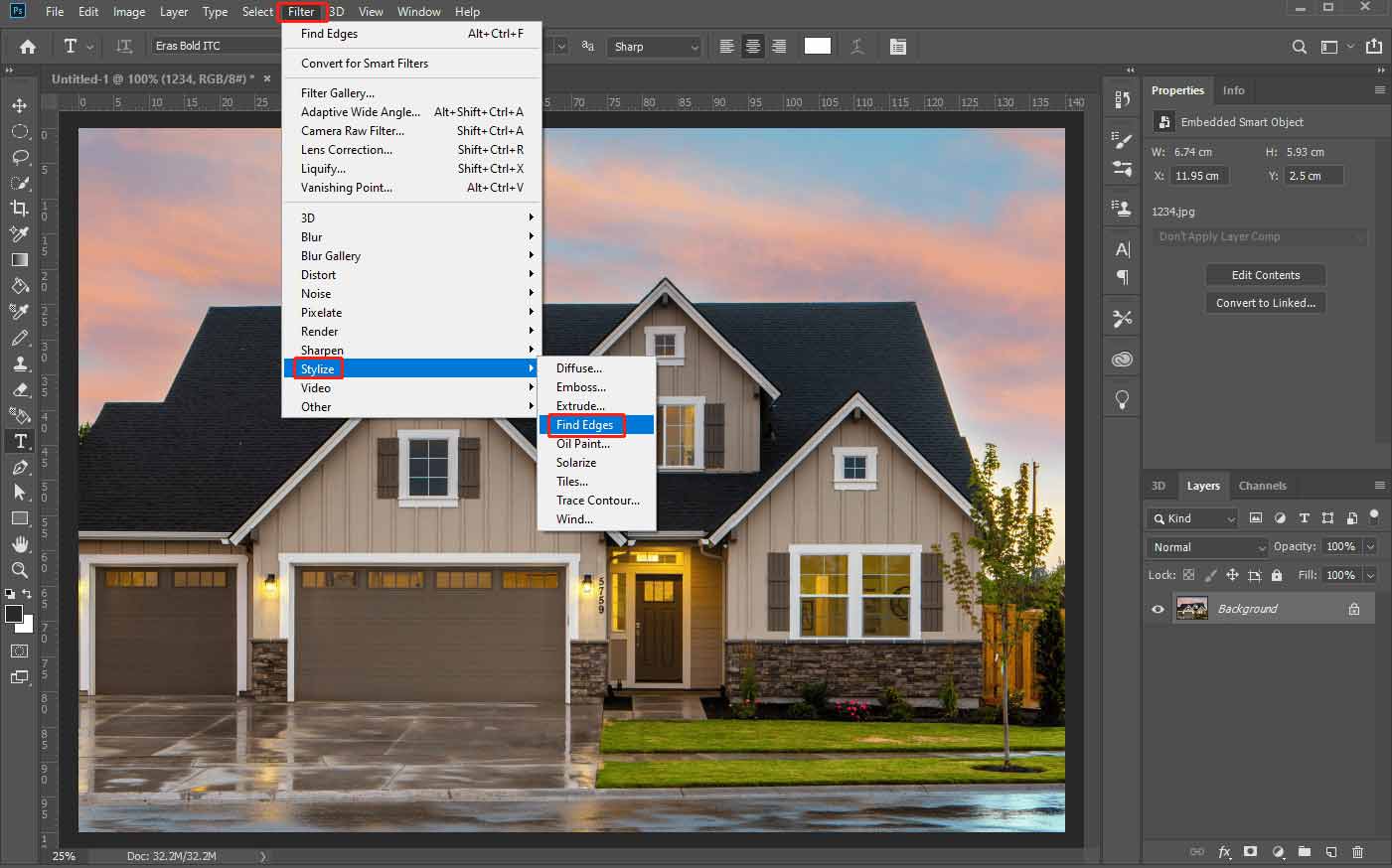
Photoshop’s Find Edges filter can recognize areas of the image with significant transitions and highlight edges, turning the original photo into dark lines on a white background.
Click Filter at the top toolbar, choose Stylize from the dropdown list, then click Find Edges.
Step 3: Add the B&W Effect
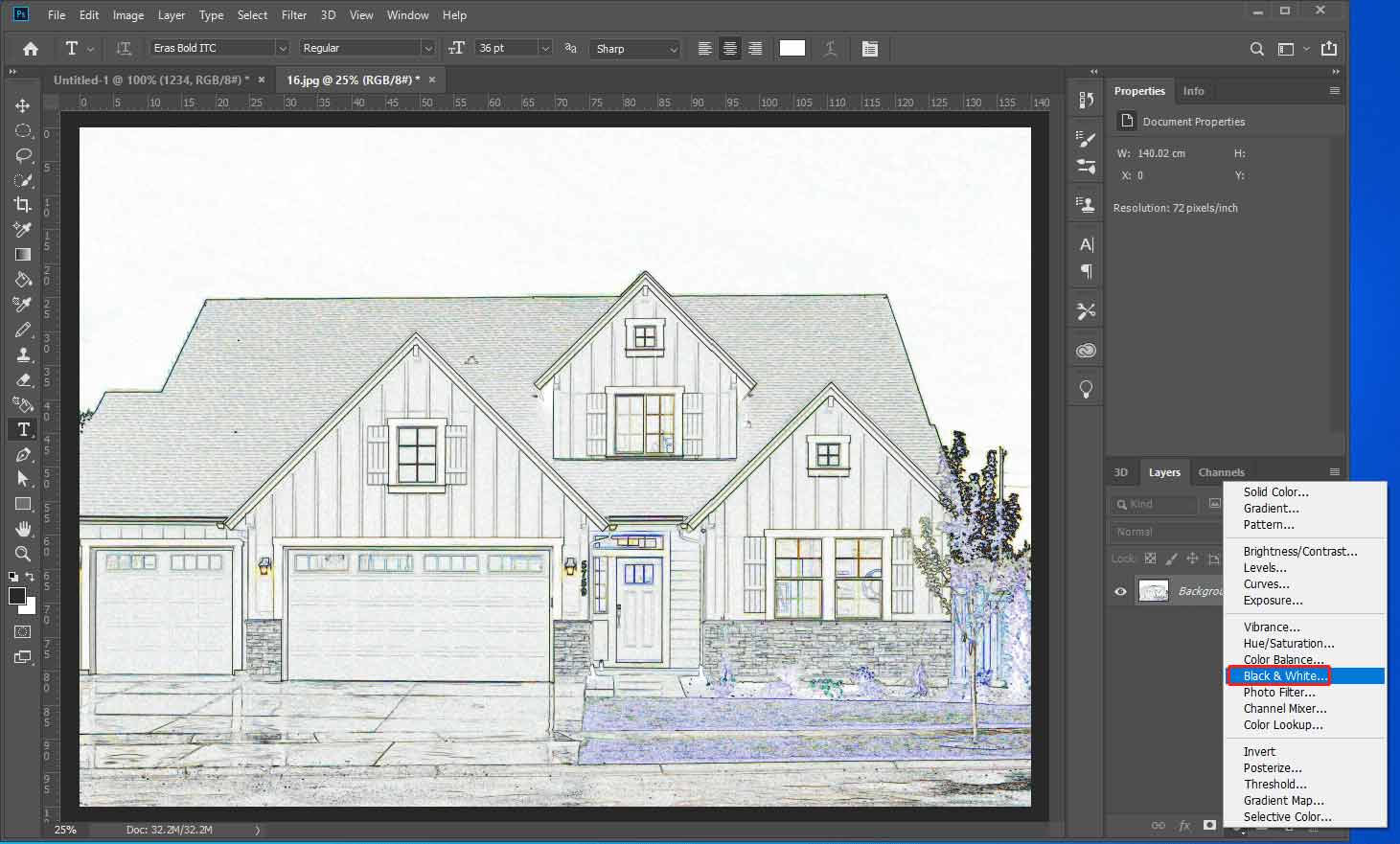
Click the Create a new file or adjustment layer button at the bottom and select Black & White… from the menu. Then, the photo will turn black and white.
Step 4: Add a Levels Adjustment Layer
Click the Create a new file or adjustment layer icon again and choose Levels…. You can then modify the image’s brightness, contrast, and color balance by adjusting intensity levels of image shadows, midtones, and highlights.
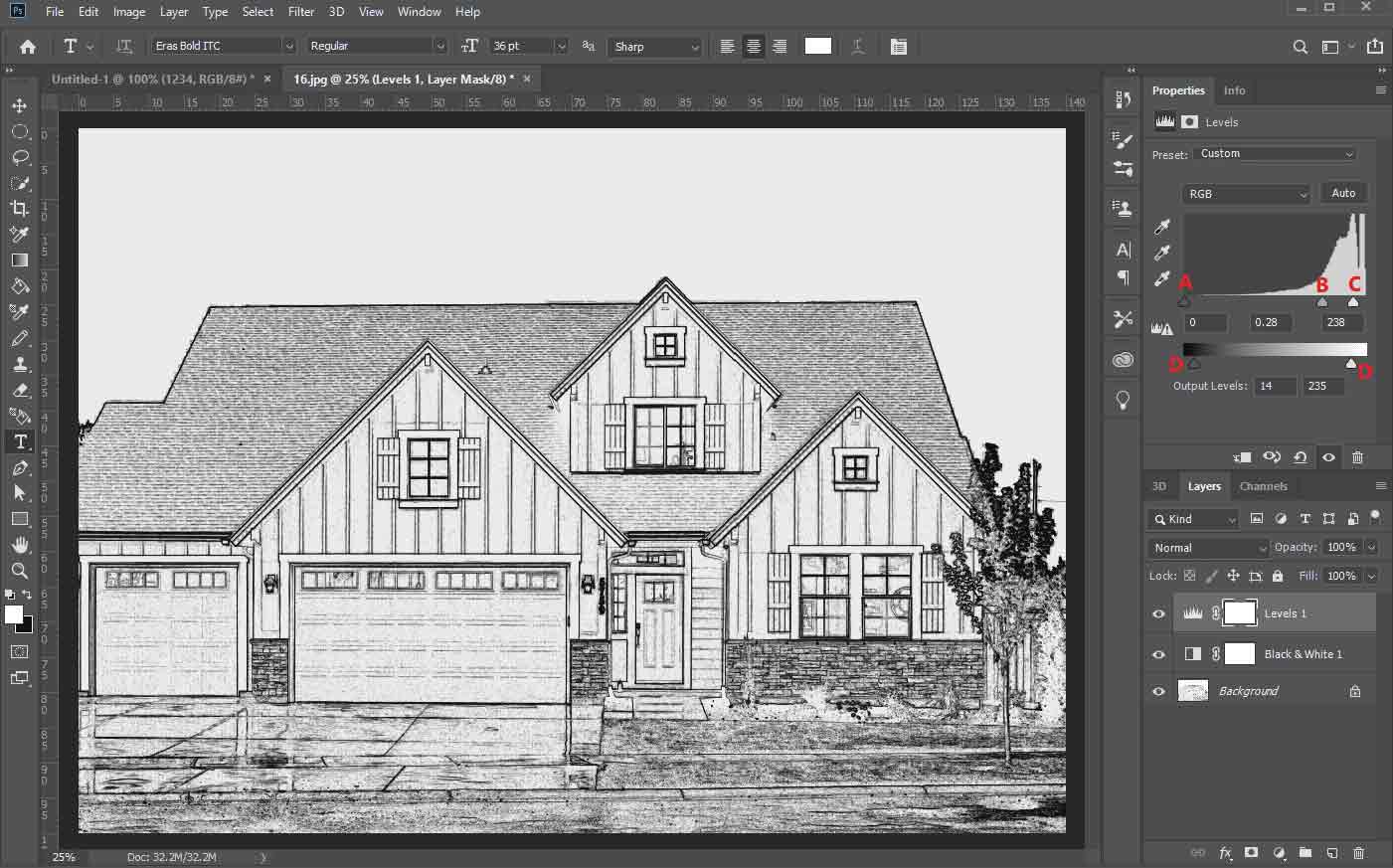
A: Shadows, B: Midtones, C: Highlights, D: Output Level sliders.
Drag these sliders to adjust black points, white points, and midtones until you’re happy with the result.
Step 5: Save Your Line Drawing
Click File > Save as and follow the on-screen prompts to save the line drawing art to your computer.
![How to Convert Video to Anime Style in Simple Steps [3 Methods]](https://images.minitool.com/moviemaker.minitool.com/images/uploads/2025/07/convert-video-to-anime-style-thumbnail.jpg)
How to Turn Photo into Line Drawing Online
It’s easy to transform a photo into a line drawing using Photoshop, right? However, if this program hasn’t yet been installed on your PC, online tools like Fotor and Photopea are also great choices for their quick access and AI-powered features.
Option 1: Fotor
Fotor is an all-in-one, AI-powered online image processing and graphic design platform. It simplifies the creation process for both beginners and experienced content creators through its easy-to-use yet powerful tools.
For instance, Fotor offers various AI art effects to turn ordinary images into stunning visuals. It allows you to transform pictures into cartoons, line drawings, Ghibli-style photos, pixel art, anime, and watercolors.
Follow the steps below to turn your photo into a line drawing with Fotor.
Step 1: Upload a Photo to Fotor
Navigate to Fotor.com and sign in with your account. Click AI Photo Editor on the homepage, then click the Upload Image button to add your photo.
Step 2: Apply the Line Drawing Effect
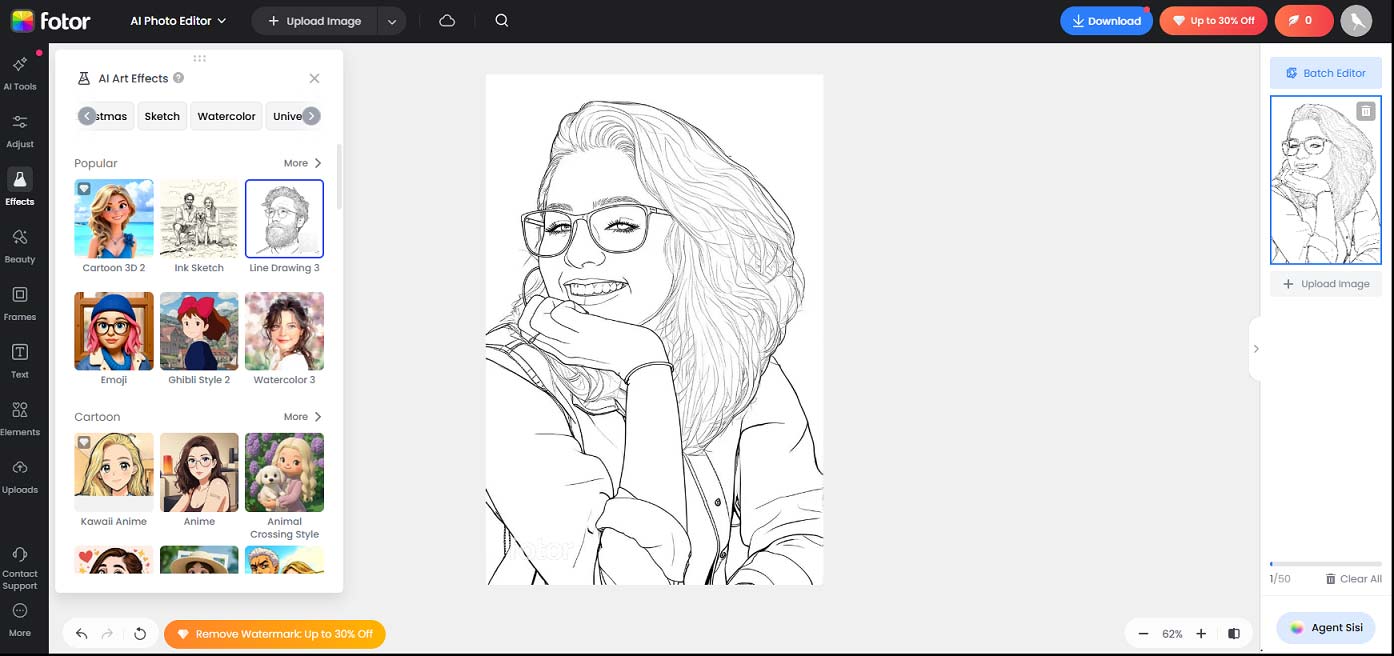
Select Effects on the left sidebar, and then the Filters tab is selected by default. Click See all next to AI Art Effects to display all the AI art effects available. To turn your photo into a line drawing, you can click the Line Drawing 3 effect to apply it. You can also select Sketch at the top to display other effects and try another line art effect.
Step 3: Save the Art Work
Click the Download button and choose the format, PNG or JPG, to save the photo.
Option 2: Photopea
Photopea is often regarded as a free alternative to Photoshop. It can be quickly accessed through a web browser and doesn’t require an account. Best of all, it’s free to use and won’t leave a watermark on the exported images.
Here’s how to turn a photo into a line drawing using Photopea.
Step 1: Upload a Photo to Photopea
Visit Photopea.com in your browser, then open the target photo from your PC by clicking Open From Computer.
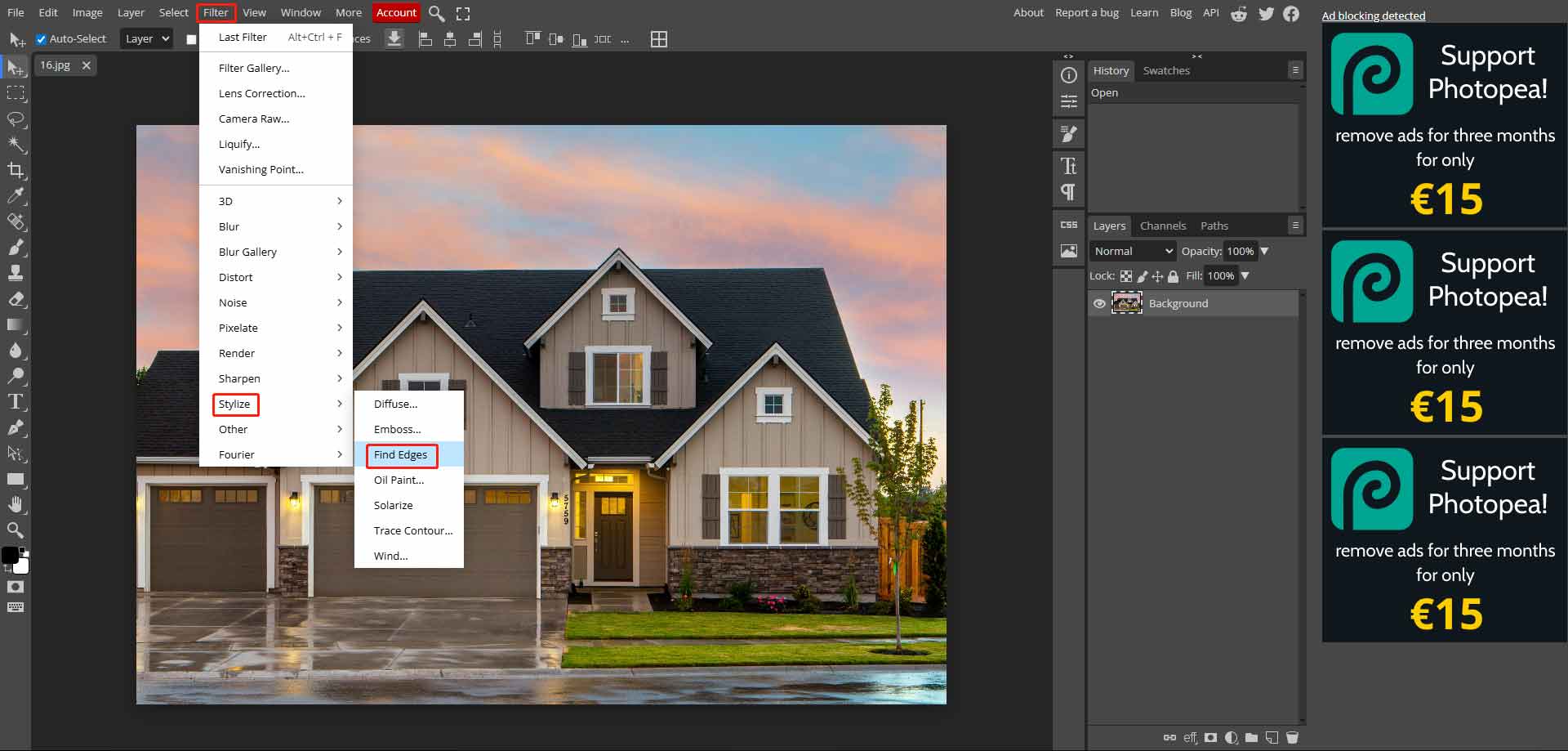
Step 2: Turn the Photo into an Outline
Select Filter > Stylize > Find Edges to create outlines around the edges of the image.
Step 3: Turn the Photo into a Line Drawing
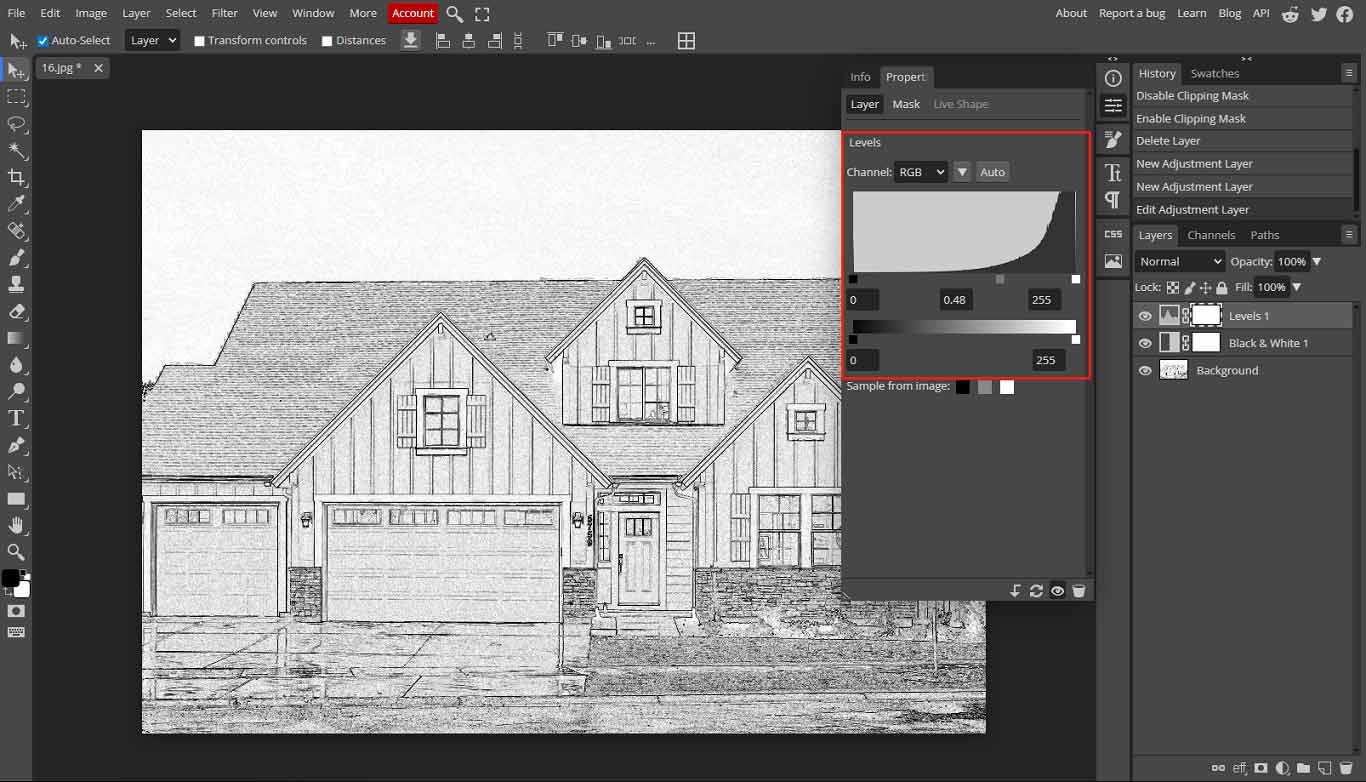
Click the New Adjustment Layer icon in the lower right corner and choose Black & White… from the list. Click the New Adjustment Layer icon again and select Levels. Then, drag the sliders in the Levels section to control the image’s brightness, contrast, and color balance.
Step 4: Save the Photo
Click File > Export as and choose an image format to save the line drawing art to your PC.
Conclusion
With the right tool, you can turn a photo into a line drawing in just a few clicks. It’s your turn now! Follow the steps above to transform your favorite photos into stunning line drawings effortlessly.
About The Author

Position: Columnist
Cora is a tech writer specializing in digital media workflows, with over six years of hands-on experience in video post-production, media transcoding, and screen capture. Her writing is always clear and practical. Cora also produces in-depth software reviews for users across skill levels to help them find the right tool and enjoy video editing.
User Comments :