

What Is Pop Up Effect
A pop-up effect is a visual method that is usually used to draw attention by making objects, including text or images, appear to abruptly emerge on the screen. Most video editors support this function, like CapCut, which offers a direct pop up effect-adding option. Also, pop-up effects can be achieved by rapidly altering an object’s size through keyframes.
The content below will show you how to add pop up effects in video step by step. Read on for more information.
![Pro Guides on How to Add Scrolling Text to Video [3 Methods]](https://images.minitool.com/moviemaker.minitool.com/images/uploads/2025/10/add-scrolling-text-to-video-thumbnail.png)
How to Add a Pop Up Text Effect in Video
CapCut is a popular and powerful video editor that offers various effects for text. It features an intuitive user interface, allowing both novices and experienced users to complete their projects with ease. In addition, CapCut offers a variety of transitions, filters, music, stickers, and more. With them, you can create an appealing and interesting video efficiently. Now, follow the instructions below to add a pop up text effect in your video.
1. Download and Install CapCut
Go to CapCut’s official website to download and install this program on your computer.
2. Import Your Video
Launch CapCut and click Create project to enter the editing page. Then, click the Import option to add the target video.
3. Add Pop Up Text Effect
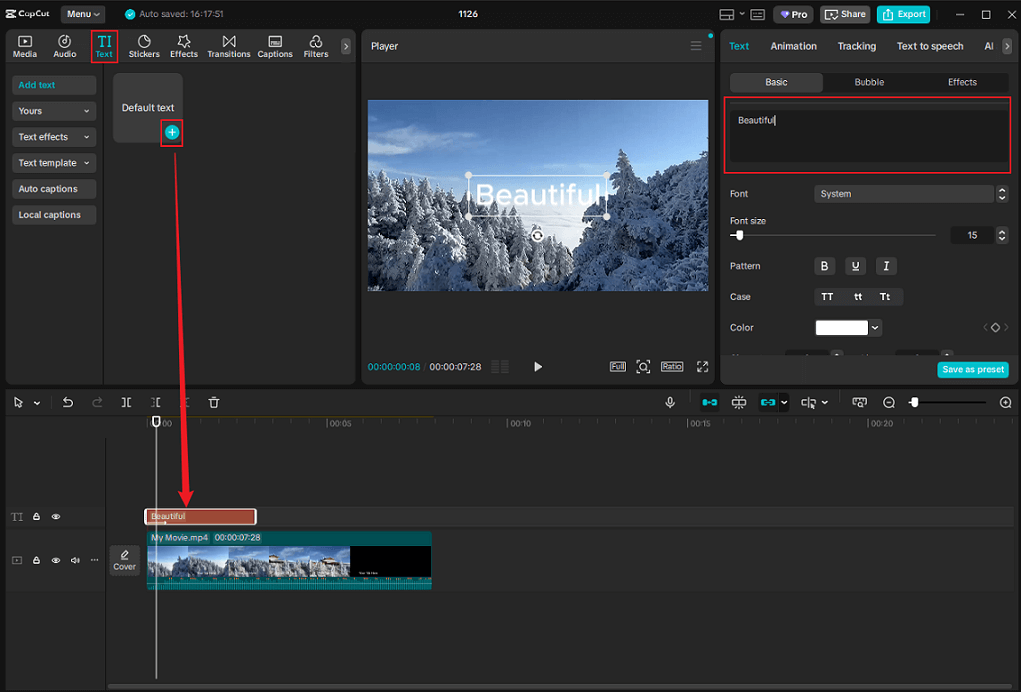
Drag the added video to the timeline. Next, choose the Text tab in the top menu and add text to the video by clicking the + icon on the Default text option. In the top right section, type the desired text in the text box.
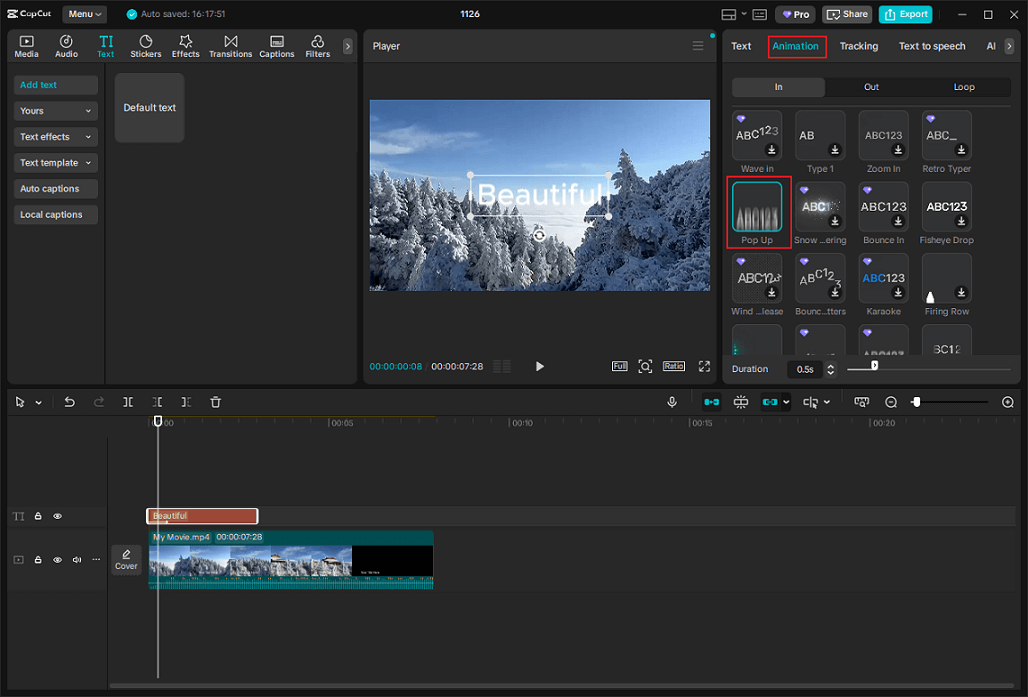
Then, enter the Animation section and click the Pop Up option.
4. Export the Video
Click the Export button in the top right, rename the output video, choose the desired output destination, set video parameters based on your needs, and then click Export to save the video.
How to Add a Pop Up Sticker Effect in Video
Canva is a feature-rich and robust video editor that comes with various editing tools. It supports many effects, like pop, rise, pan, fade, blur, wipe, and more. In addition, Canva has AI-powered tools, empowering you to create stunning videos easily.
Here’s how to add pop up sticker effect in video with Canca.
1. Access Canva
Go to Canva’s office website on your browser.
2. Upload Your Video
Click the Upload file option to import your video. Then, drag it to the timeline.
3. Add a Sticker to the Video
Go to the Elements section, choose the Stickers tab, and add a sticker to the video.
4. Add Pop Up Effect to the Sticker
Click the sticker layer on the timeline. In the preview window, choose the Animate tab, and select Pop.
5. Export the Video
Click the Share button at the top right and click Download to save the video.
How to Add a Pop Up Image Effect in Video
FlexClip is a reliable online video editing tool that can help you add a pop up image effect in a video. It is easy to use and access, enabling you to complete the task with no hassle. Just follow the tutorials below.
1. Access FlexClip
Open your browser and search for FlexClip.
2. Upload Your Video
Click the Upload icon to add your video to FlexClip.
3. Add the Target Image as an Overlay
Drag the added video to the timeline. In FlexClip, locate the image you wish to set as a pop-up effect, or upload your own image. Then use the picture-in-picture icon to add it as an overlay to your video.
4. Add Pop Up Effect to the Image
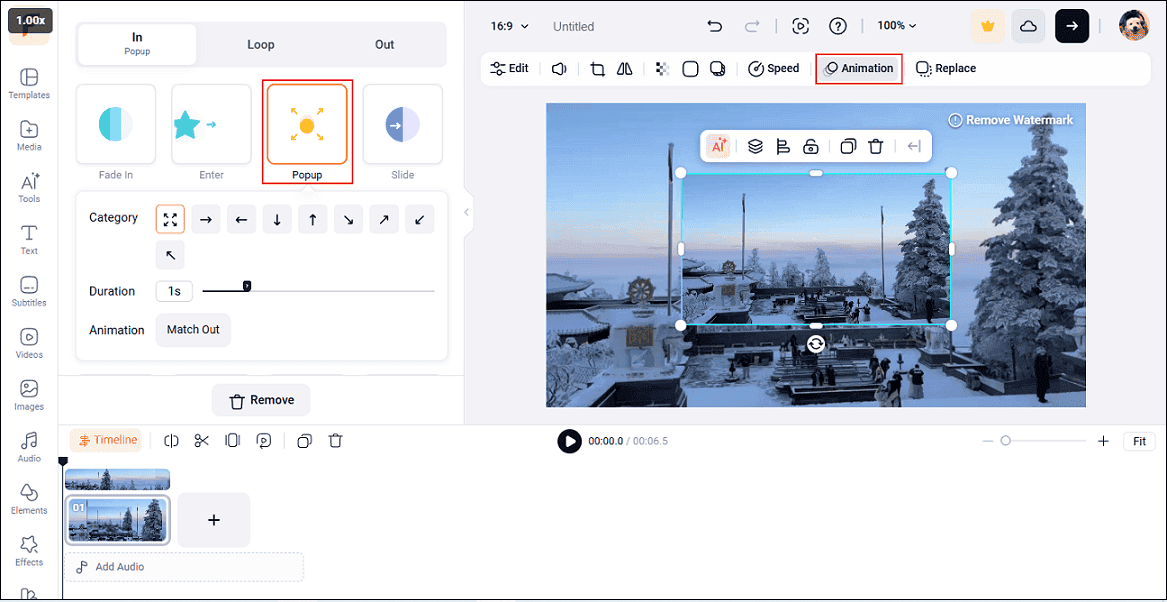
Choose the image overlay in the preview window, choose the Animation tab, and choose Popup.
5. Export the Video
Click the Export icon at the top right, choose a video resolution, and click Export with Watermark.
That’s all! With the three reliable tools above, you can add pop up effects in video with no effort!
MiniTool MovieMakerClick to Download100%Clean & Safe
![Pro Guide on How to Add a Content Warning to Video [2 Methods]](https://images.minitool.com/moviemaker.minitool.com/images/uploads/2025/10/add-a-content-warning-to-video-thumbnail.docx.png)
In Summary
This post shows you how to add pop up effects in video with three reliable and professional video editors. Choose the one you prefer. Hope this article can help you a lot!
User Comments :