

Have you ever wondered what your pet would look like if it became human? I know it sounds like a crazy idea, but keep reading, and you can make it happen. In the content below, I recommend three powerful AI pet to human generators, which can help you turn your pets into human images.
Pet to Human Generator 1. EaseMate AI
EaseMate AI is a professional and easy-to-use online image generator that converts your pet to a human in a photo in a flash. It features an intuitive user interface and only takes a few clicks to complete your tasks. Plus, ChatGPT-4o and Gemini power EaseMate AI’s pet-to-human generator, which can capture all key features from the original image. Now, follow the step-by-step guide below to convert pet photos into human images.
Step 1. Access EaseMate AI
Go to EaseMate AI’s pet-to-human generator (Visit https://www.easemate.ai/pet-to-human).
Step 2. Upload a Pet Photo
Click the Choose a file option to upload your pet’s picture.
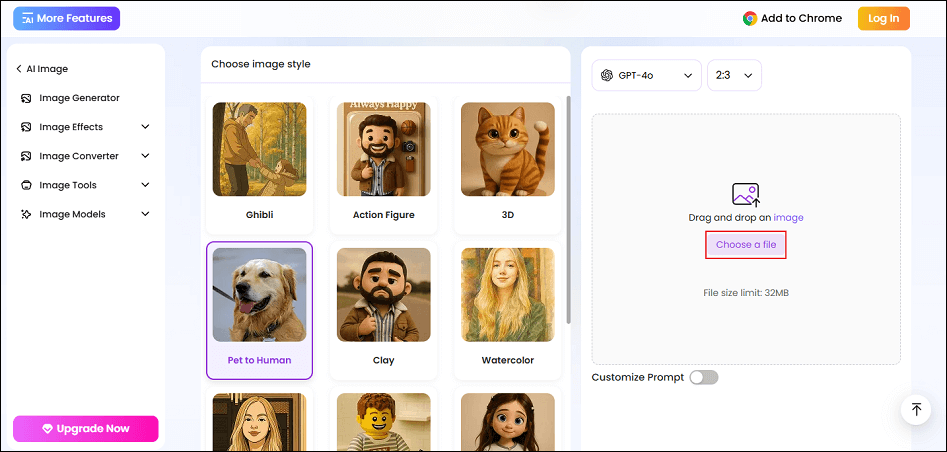
Step 3. Start Converting Pet to Human
Click the Generate button to start creating a human image for your pet.
Step 4. Download the Picture
When the generating process completes, click the Download option to save the photo.
Pet to Human Generator 2. Kaza ai
Kaza ai, as its name suggests, is an AI-powered image generator that can efficiently transform your pet into a human in a picture. Plus, this versatile tool can also enhance/upscale images, change eye color, make a photo black and white, turn a photo into a sketch/line drawing, remove watermarks, remove logos, and more. Kaza ai offers a quick solution. With a few clicks, you can convert a pet into a human in a photo.
Follow the instructions below.
Step 1. Go to Kaza ai’s Pet to Human Generator
G to Kaza ai’s pet to human generator by visiting https://kaze.ai/ai-pet-to-human.
Step 2. Upload a Pet Photo
Click the Image icon to import your pet’s photo.
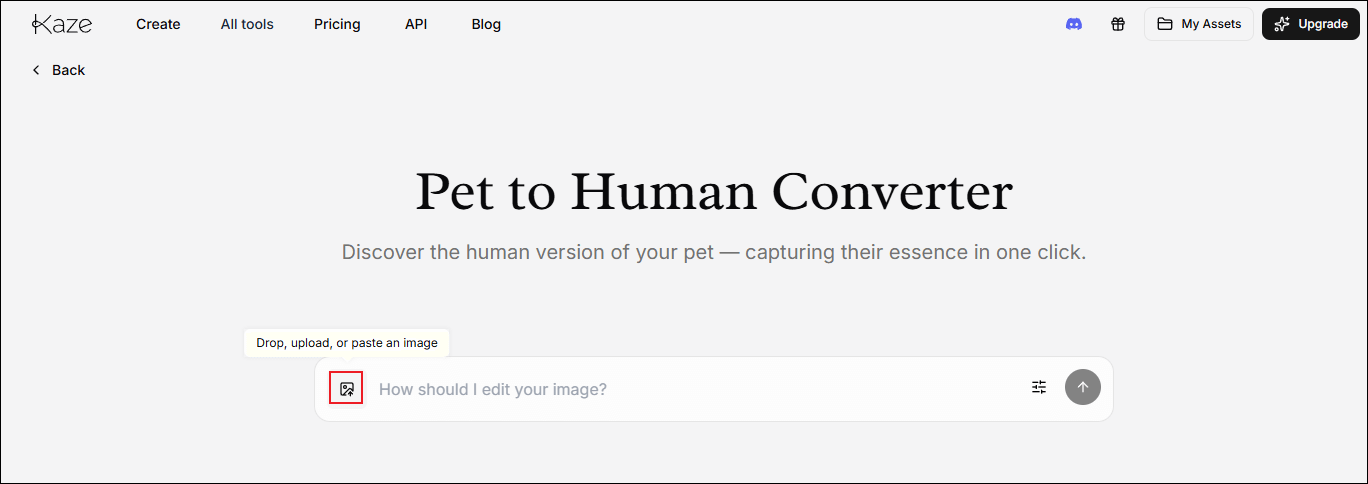
Step 3. Apply Prompt in the Box
Click the text box and choose the turn cat to human option.
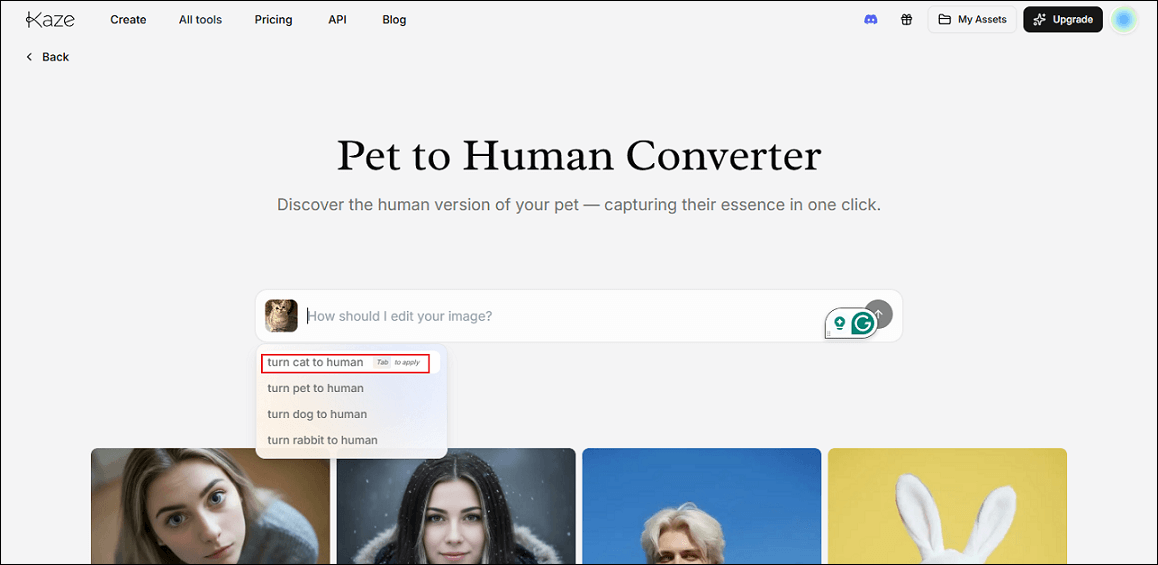
Step 4. Convert Pet to Human
Click the up-arrow icon to start creating a human image for your pet.
Step 5. Download the Image
Click the Download icon on the generated photo to save it.
Pet to Human Generator 3. Fotor
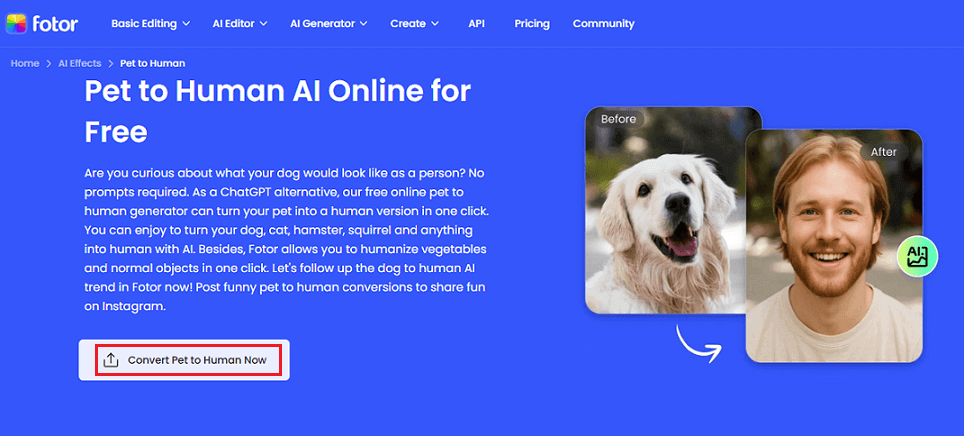
Fotor is a reliable image editor powered by AI that can convert a pet to a human in seconds. It offers comprehensive photo editing tools to meet both daily and creative needs. You can effortlessly crop, resize, and rotate photos while adjusting brightness, contrast, saturation, and sharpness.
In addition, Fotor also has a wide range of stylish filters and effects to enhance photos, along with practical features like collage creation, text overlays, and borders. However, it requires a subscription to generate pet-to-human photos.
Just follow the guide below to convert a pet to a human with this AI pet to human generator.
Step 1. Access Fotor’s Pet to Human Generator
Go to Fotor’s pet to human generator by visiting https://www.fotor.com/features/pet-to-human/.
Step 2. Upload a Pet Picture
Click the Convert Pet to Human Now to upload the target photo.
Step 3. Generate the Photo
After uploading the photo, the tool will start generating automatically.
Step 4. Download the Photo
Click the Download button to save the generated photo.
Bonus: Merge Multiple Photos into a Video
Want to create a video with multiple cherished photos? MiniTool MovieMaker can do you a favor! It is a powerful and feature-rich video editor that supports photo collage, multi-track editing, photo/video merging, high-resolution editing, color correction, and more features. With this video editor, you can create a stunning video with your pet photos!
In addition, MiniTool MovieMaker offers custom options for output videos, allowing you to adjust frame rate, quality, resolution, bitrate, etc. Just click the download button below to unlock endless possibilities!
MiniTool MovieMakerClick to Download100%Clean & Safe
Final Words
To create an exclusive human image for your pets, this post recommends three expert pet to human AI generators and shows you how to complete the task in steps. Feel free to choose the one you prefer and start your creation now!
User Comments :