

Introduction to Zootopia
Zootopia is an American animated film produced by Walt Disney Animation Studios, released in 2016. The film tells the story of rookie police officer Judy Hopps and con artist fox Nick Wilde teaming up to uncover a conspiracy behind the disappearance of carnivores. The film has won the hearts of many audiences with its uniquely charming art style. It has broken box office records in multiple countries, grossing over $1 billion worldwide and becoming the fourth highest-grossing film of 2016.
In the following content, I’ll show you how to add Zootopia filters to your photos, transforming you into a Zootopia citizen in no time! Read on for more.
Add a Zootopia Filter to a Photo with FlexClip
FlexClip is an online and professional image generator that can add a Zootopia filter to your photo effortlessly and quickly. It harnesses cutting-edge AI technology—simply upload your photos to experience the magic of Zootopia filters and embark on your own character transformation journey. In addition, FlexClip features an intuitive user interface, allowing everyone to complete their task with ease. Now, you can follow the guides below to get your Zootopia picture.
1. Access FlexClip’s AI Photo Editor
Visit https://www.flexclip.com/tools/ai-photo-editor/ and click Edit Now to enter the main interface.
2. Upload Your Picture
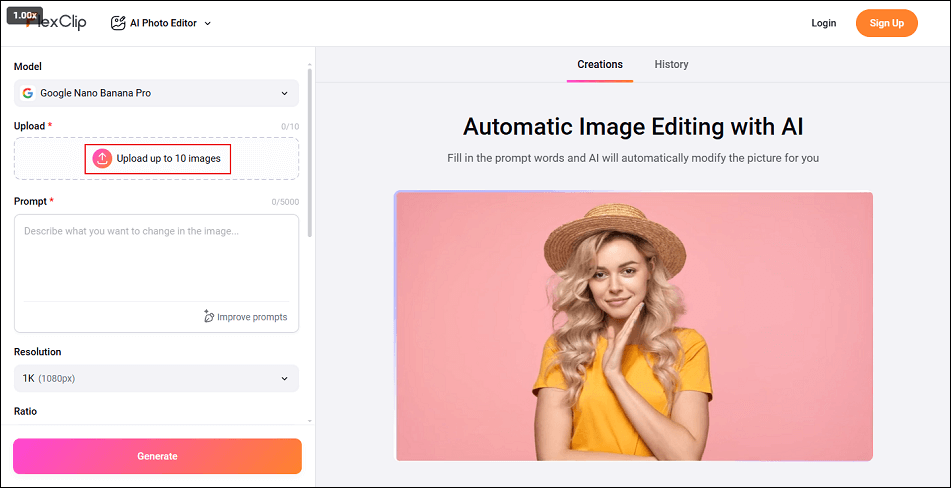
Click the Upload up to 10 images option to add your photo.
3. Add a Zootopia Filter to the Photo
Input the description text into the prompt box. Then, click the Generate button to start turning the picture into Zootopia style.
4. Save the Photo
When the generating process completes, click the Download button to save the picture.
Add a Zootopia Filter to a Photo with EaseMate AI
EaseMate AI is an AI-powered and easy-to-use online image editor. It may quickly turn your selfie into an adorable Zootopia avatar while maintaining all of your facial and physical characteristics. This Zootopia character generator flawlessly combines cartoon charm with realistic appearance, whether your goal is to become Nick, Judy, or Benjamin Clawhauser.
Moreover, you can customize Judy Hopps-style rabbit ears, Nick Wilde-style fox tails, or dress your generated character in various themed outfits, adding glasses, hats, or other accessories. Whatever you envision—simply describe your dream Zootopia character in words, and EaseMate AI will create a lifelike animal character.
Here’s how to add a Zootopia filter to your photo using EaseMate AI.
1. Access EaseMate AI’s Zootopia Filter Section
Visit https://www.easemate.ai/zootopia-filter.
2. Upload Your Photo
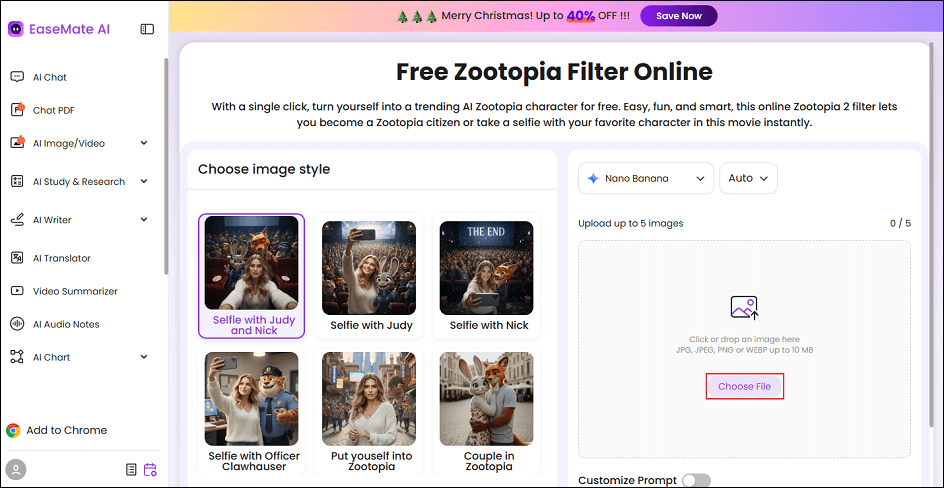
Click the Choose File option to add your picture.
3. Choose a Zootopia Filter
In the right section, select the desired Zootopia filter.
4. Generate the Picture
Click the Generate button to start adding the filter to the picture.
5. Download the Photo
When the generating process completes, click the Download option to save the picture.
Add a Zootopia Filter to a Photo with MyShell Art
MyShell Art is a user-friendly and expert online image editor that can turn your selfies into Zootopia style in a flash. Except for that, it also provides various other filters, like Labubu, Ghibli, Disney, Minecraft, and more. This Zootopia image generator features a straightforward user interface, allowing you to convert a photo to Zootopia with no effort. Follow the instructions below.
1. Go to MyShell Art’s Zootopia Filter
Visit https://art.myshell.ai/filter/zootopia-filter.
2. Upload Your Picture
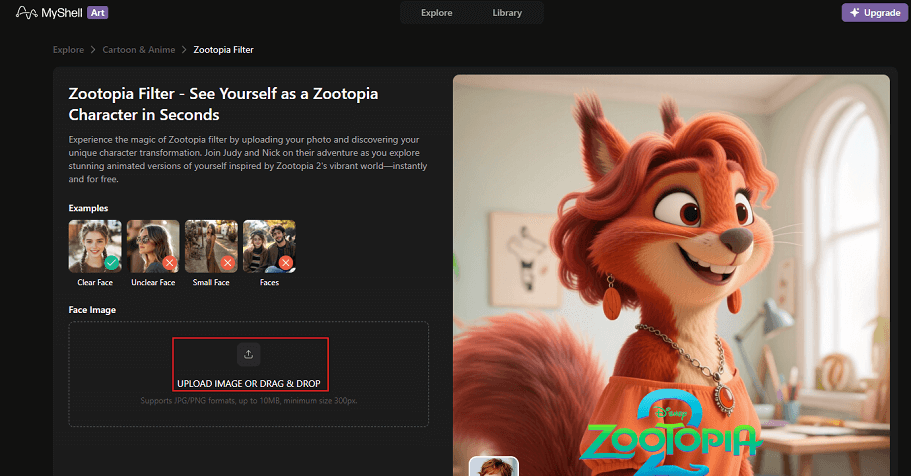
Click the UPLOAD IMAGE OR DRAG & DROP area to upload your picture.
3. Convert the Picture to Zootopia Style
Click the Generate button to start adding a Zootopia filter to the picture.
4. Save the Picture
Once the generating process is done, click the Download option to save the photo.
That’s all! With the three reliable tools above, you can turn your pictures into Zootopia style with no hassle!
In Summary
This post provides three professional online tools to add a Zootopia filter to your pictures. They are all easy to use and offer a quick solution. Choose the one you prefer and start your Zootopia journey!
User Comments :