

This post details how to make a GIF black and white using MiniTool MovieMaker, Photoshop, and Ezgif. Explore these effective methods to give your animation a different look.
How to Make a GIF Black and White on Windows
This section introduces two desktop applications to transform your GIF into black and white animations.
Method 1: MiniTool MovieMaker
MiniTool MovieMaker is a free GIF editor equipped with essential editing tools and various effects. Whether you desire to trim GIF length, change the dimension of a GIF, adjust the playback speed, apply filters or effects, or add text to GIFs, this program has you covered.
Best of all, MiniTool MovieMaker is easy to use and won’t leave a watermark on your exported GIF.
Here’s how to make a GIF to black and white using MiniTool MovieMaker.
Step 1: Install the Software
First, you need to download the GIF editor on your computer. Click the button below to get the installer, open the file, and follow the on-screen prompts to install the application.
MiniTool MovieMakerClick to Download100%Clean & Safe
Step 2: Upload a GIF
After launching the software, close the promotion window to access the main user interface and click Import Media Files to import your GIF. Then, drag and drop it to the timeline to start editing.
Step 3: Convert the GIF to Black and White
Select the Filters option at the top, then click LUT from the left sidebar, and you’ll see several black and white effects. Download one and click the + icon at the bottom to add it to the timeline.
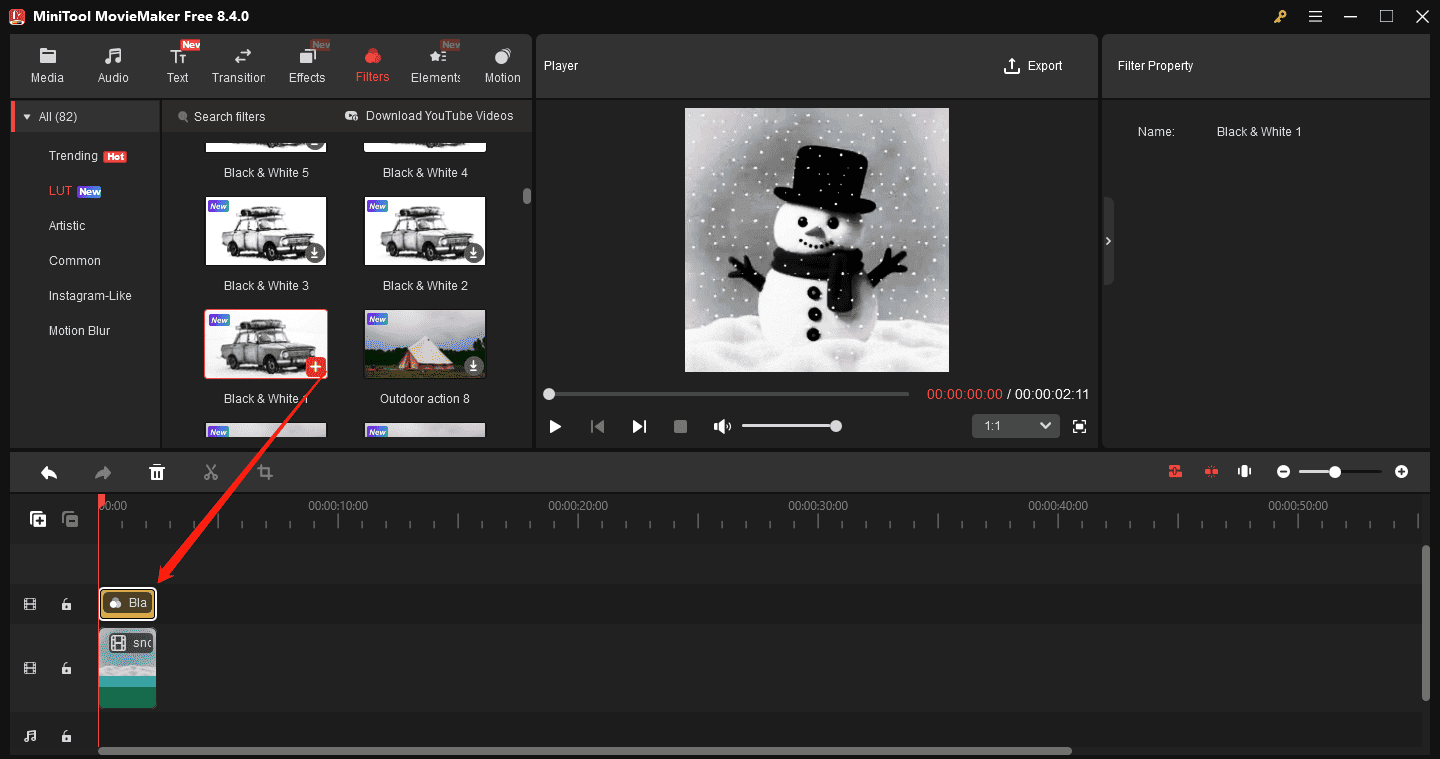
Alternatively, you can adjust the saturation to make the GIF black and white. Select it on the timeline, then go to the Color tab in the Video Property, and drag the Saturation slider all the way to the left (-100).

You can also adjust contrast and brightness to make your GIF look more natural
Step 4: Save Your GIF
Open the Export window by clicking the Export option in the upper-right corner of the player window. Expand the Format menu and choose GIF from the dropdown. Complete the other settings and click Export.
Method 2: Photoshop
As a professional-grade image editor, Photoshop covers almost all tools and effects. Undoubtedly, it lets you make colorful GIFs black and white to add a sense of vintage.
Here’s how to make a GIF black and white in Photoshop.
Step 1: Open your GIF.
When you open the application, go to File and select Open to open the GIF from your computer.
Step 2: Convert GIF to Black and White
Do one of the following to convert your GIF to grayscale:
- Select Image in the top, and choose Mode > Grayscale > Merge > Discard.
- Click the Create new fill or adjustment layer icon in the lower right corner and select Hue/Saturation. Then, move the Saturation slider to the left until it shows -100.
- Click the Create new fill or adjustment layer icon and choose Black & White.
- Click the Create new fill or adjustment layer icon and select Gradient Map.
- Click the Create new fill or adjustment layer icon and choose Channel Mixer. Tick the Monochrome box. You can also modify the red, green, blue, and contrast settings to edit the GIF.
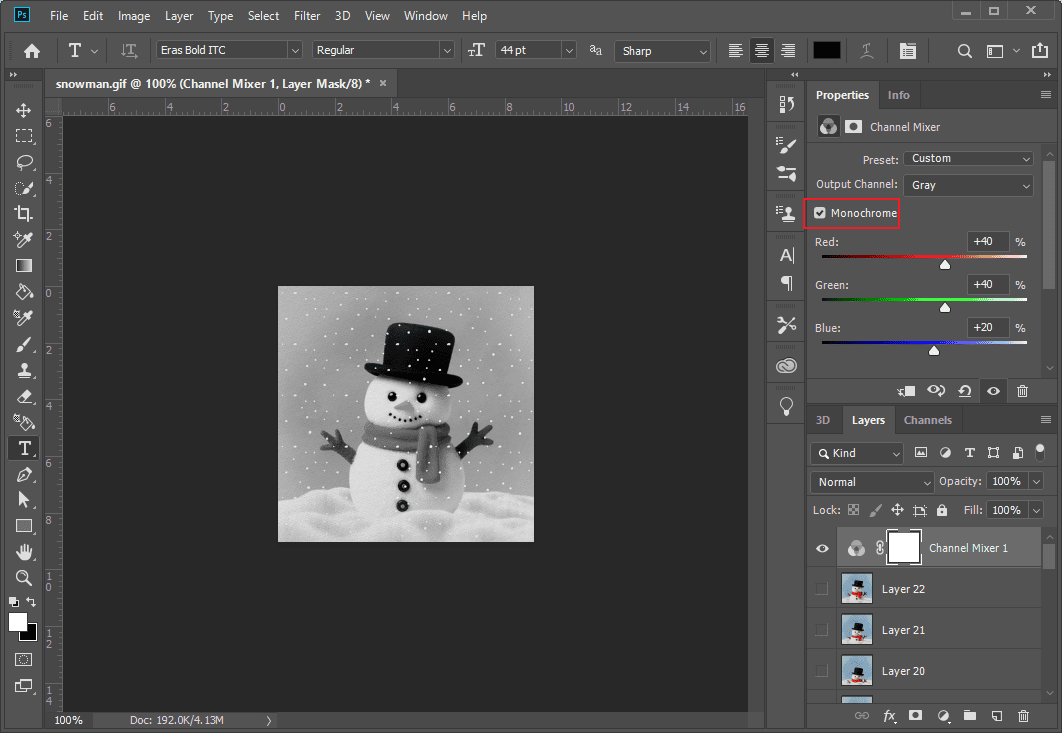
Step 3: Save the GIF
To access the export options, navigate to File > Export > Save for Web (Legacy). Make sure GIF is selected as the format, then click Save to download the file to your computer.
How to Make a GIF Black and White Online
Ezgif is a free online GIF maker and editor that allows you to create GIFs from videos/images and enhance your animation. For instance, it allows you to resize, rotate, crop, optimize, and add text to GIFs. Additionally, this platform provides a wide variety of filters and effects for easy GIF optimization.
The only drawback is that Ezgif cannot provide an instant preview after selecting an effect. The preview is available after generating the result.
How to make a GIF black and white using Ezgif? Here’s the quick guide.
Step 1: Upload Your Ezgif
Navigate to ezgif.com and select Effects from the top toolbar. Then, click Choose File to select the GIF, and click the Upload button to continue.
Step 2: Convert the GIF to Black and White
After the GIF loads, tick the grayscale box in the Color presets section.

Scroll down and click the Apply selected button to start generating the black and white GIF. Once done, the result will appear in the Processed image window.

Step 3: Download the GIF
Click the Save option at the bottom of the Processed image window to download the GIF to your computer.
Conclusion
How to make a GIF black and white? This post gives three solutions to remove colors from your animation and add a classic aesthetic. Meanwhile, this will reduce GIF file size, as color information uses more data.
About The Author

Position: Columnist
Cora is a tech writer specializing in digital media workflows, with over six years of hands-on experience in video post-production, media transcoding, and screen capture. Her writing is always clear and practical. Cora also produces in-depth software reviews for users across skill levels to help them find the right tool and enjoy video editing.
User Comments :