

What are Cyberpunk Filters
Cyberpunk filters are a type of digital effect that imbues photos and videos with a high-tech dystopian aesthetic. Characterized by vivid neon hues, they employ bold, shimmering colors such as blue, pink, and purple to create a futuristic city vibe.
Cyberpunk filters give your photos or videos a distinctive, tech-infused look, making your posts stand out on social media with bright neon colors and futuristic style.
In the content below, I’ll show you how to add a cyberpunk filter to a photo/video.

How to Add a Cyberpunk Filter to a Photo
Here are two easy and reliable methods to convert a photo to cyberpunk.
Method 1. Use FlexClip
FlexClip is a browser-based image editor that is powered by AI, empowering you to transform photos to cyberpunk style with no effort. It can transform ordinary street photos into eye-catching cyberpunk scenes, add futuristic sci-fi elements to your portraits, and more.
In addition, FlexClip is available on both PC and mobile devices. Whenever and wherever you are, you can add a futuristic touch to your photos. Moreover, this tool guarantees 100% security for your information. No one can access your pictures except you.
Now, let’s transform your picture into cyberpunk style.
1. Access FlexClip’s Cyberpunk Filter
Visit https://www.flexclip.com/tools/photo-to-cyberpunk/.
2. Upload Your Picture
Click the Upload a Photo button to upload your picture.
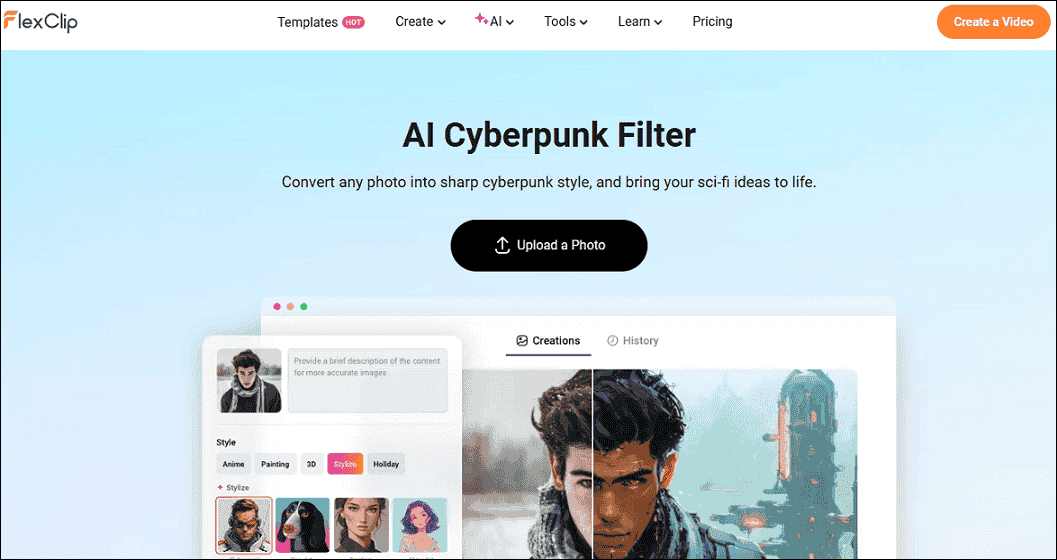
3. Choose a Cyberpunk Filter
In the Stylize section, choose the preferred cyberpunk filter.
4. Start Generating the Picture
Click the Generate button to transform the photo to cyberpunk style.
Method 2. Use EaseMate AI
EaseMate AI is a powerful and user-friendly online cyberpunk character generator that can add glowing effects, neon colors, urban moods, and more to your pictures.
In addition, EaseMate AI is powered by GPT-4o and Gemini 2.0 Flash, supporting further customization settings. Enter a more detailed description in the custom prompt box to generate images that better meet your needs. Except for cyberpunk, it offers additional filters, including Ghibli, illustration, cartoon, clay, and Lego, among others.
Here’s how to convert a photo to cyberpunk with EaseMate AI.
1. Go to EaseMate AI’s Photo Generator
Visit https://www.easemate.ai/webapp/chat?from=ai-photo-generator.
2. Upload Your Picture
Click the Choose a file option to upload your image.
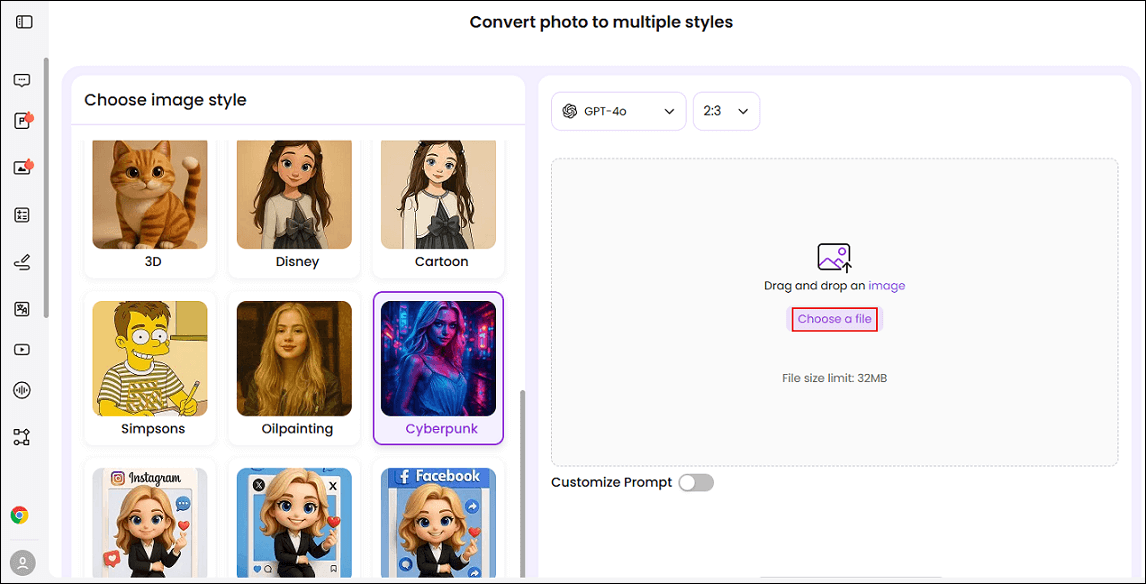
3. Generate the Photo
Make sure the Cyberpunk filter is selected. Then, click the Generate button to apply the filter to your photo.
4. Download the Photo
When the Cyberpunk photo is generated, click the Download button to save the photo.
How to Add a Cyberpunk Filter to a Video
CapCut can help you add a cyberpunk filter to a video. It is a powerful and well-known video editor, featuring an intuitive interface and a wide range of editing functions. It can apply highly creative cyberpunk filters to videos, transforming raw footage into visually stunning works.
In addition, CapCut also offers a wide range of cyberpunk sound effects and adjustable neon lighting effects to make your cyberpunk themes come to life. Now, follow the instructions below to add a cyberpunk filter to your video.
1. Download and Install CapCut
Go to CapCut’s official website to download and install it on your computer. Then, launch it.
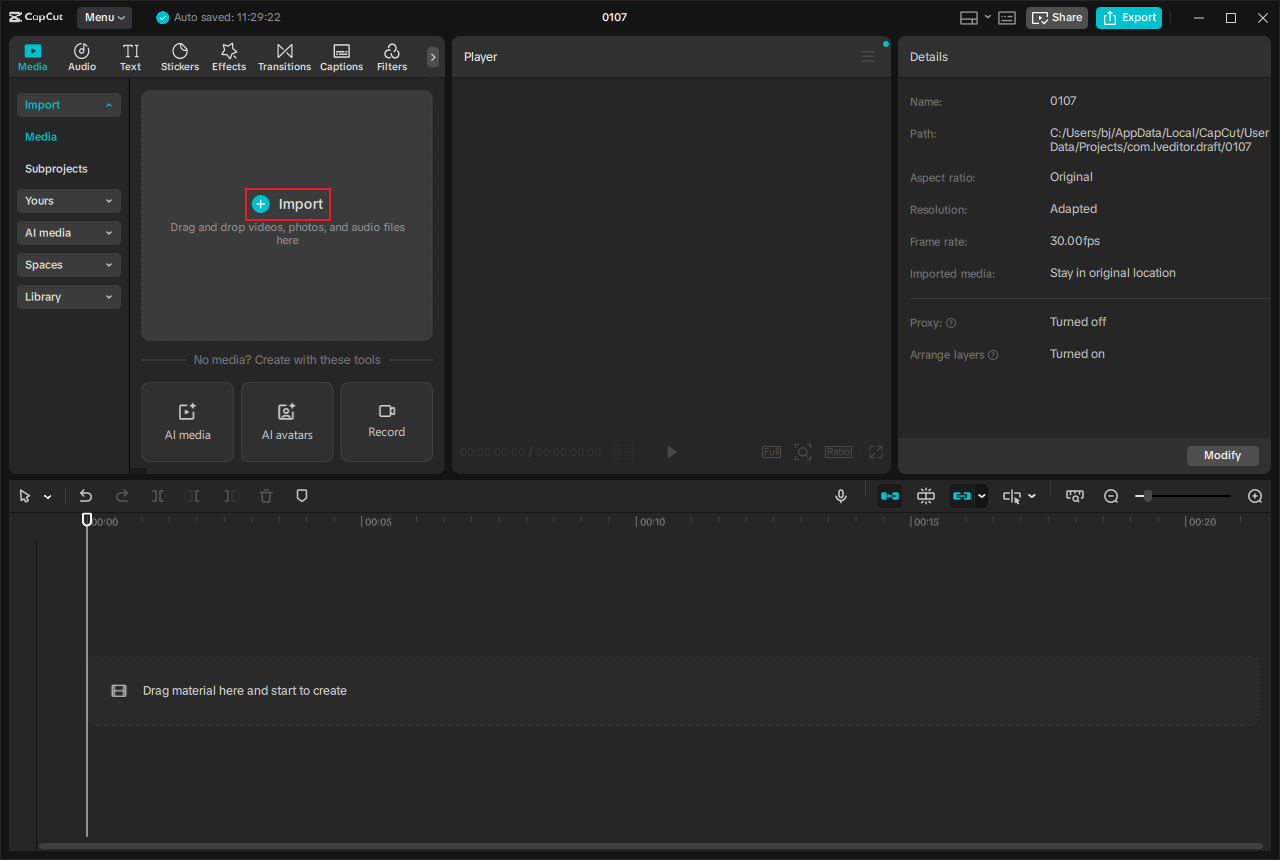
2. Import Your Video
Click Create object to enter the editing page. Then, click the Import option to add your video.
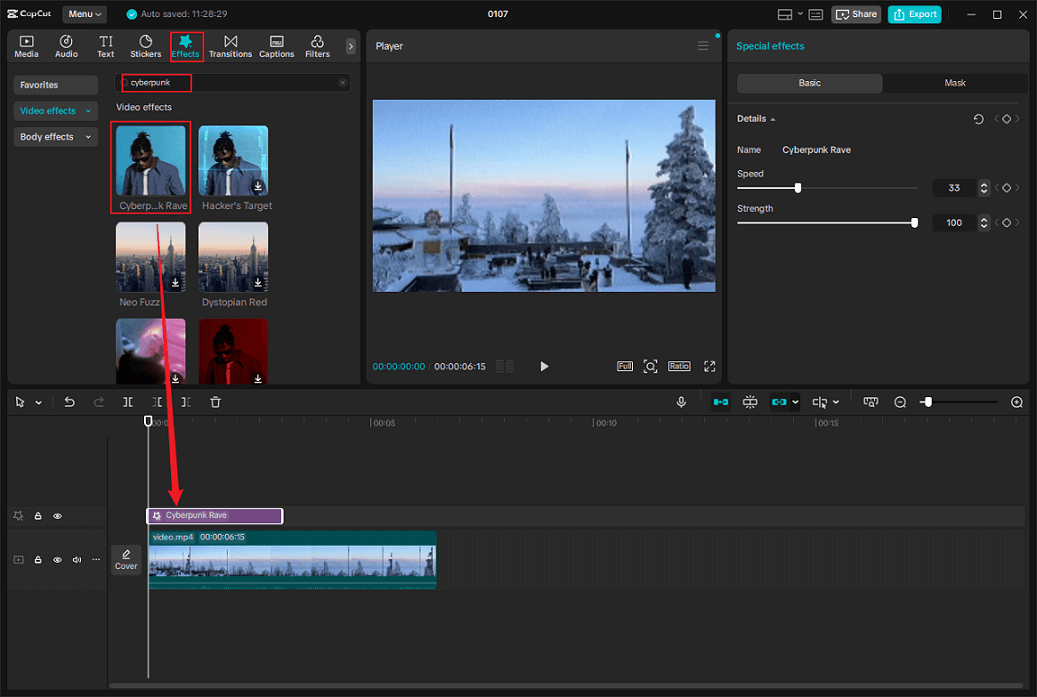
3. Add a Cyberpunk Filter
Drag the added video to the timeline. Next, go to the Effects section, search for cyberpunk, download the desired cyberpunk filter, and add it to the video.
4. Export the Video
Click the Export button at the top right to access the Export window. There, you can customize video parameters and click Export again to save the video.
That’s all!
MiniTool MovieMakerClick to Download100%Clean & Safe

In Summary
Applying a cyberpunk filter to photos or videos infuses them with a futuristic neon glow, heightening visual impact and creating an unforgettable visual feast. This post offers a step-by-step guide on how to generate photos/videos in a cyberpunk style. Hope you find it helpful!
User Comments :