

CCTV videos play an indispensable role in our daily lives. Improving their clarity is crucial when details matter. This post will introduce 3 practical methods to enhance CCTV video quality using HitPaw, Fotor, and AVCLab Video Enhancer.
CCTV video refers to the footage recorded by Closed-Circuit Television (CCTV) systems, which use connected cameras to monitor and capture activities in specific areas for security purposes. As a type of surveillance camera, CCTV camera is commonly used in public spaces, businesses, and homes to help deter crime, track incidents, and provide evidence when needed.
CCTV videos often appear blurry or hazy due to poor lighting conditions or low resolution. That is why we created this guide to help you improve CCTV video quality and achieve clearer details. In the following section, we will share 3 practical tools to help you enhance CCTV video quality.
Method 1: HitPaw
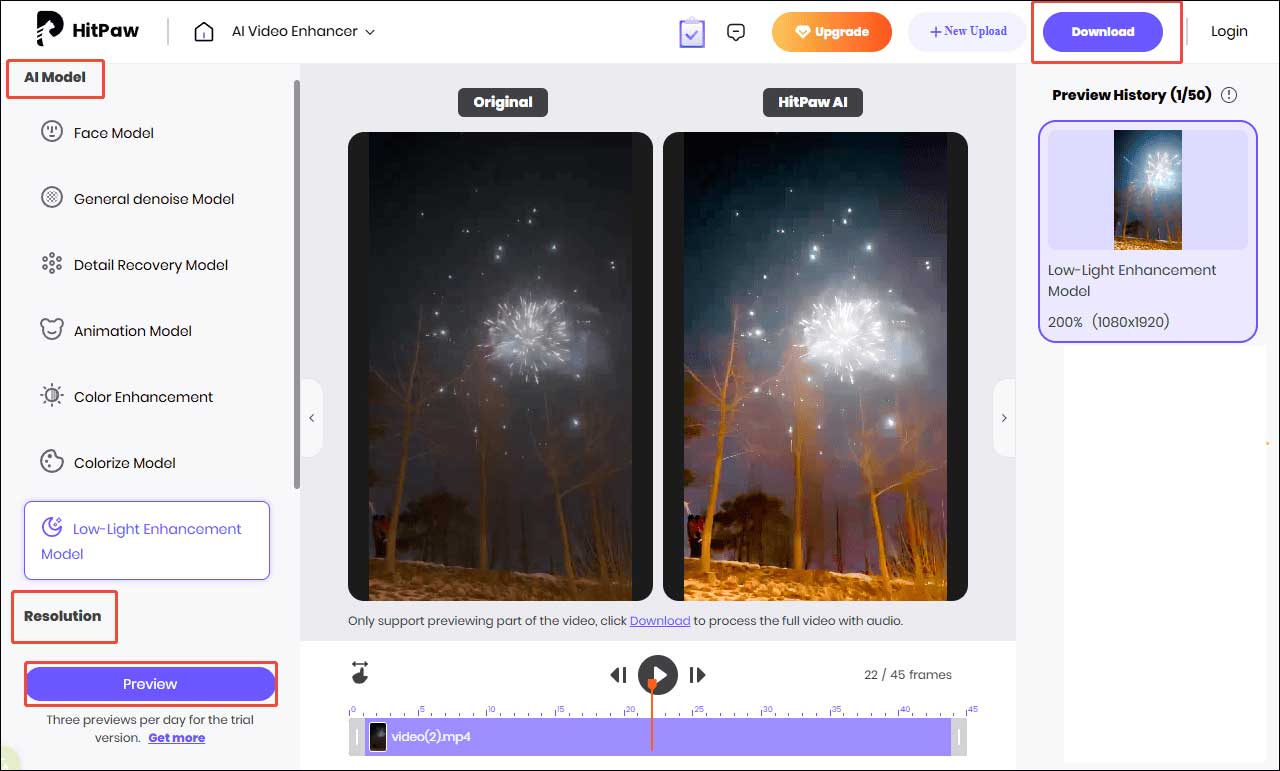
HitPaw provides an online video enhancer tool that uses advanced algorithms to improve CCTV video clarity, enhance color accuracy, and sharpen overall details. It includes multiple enhancement models designed for different scenarios. For instance, the Low-Light Enhancement Model boosts brightness and contrast in dark CCTV footage. The Detail Recovery Model helps restore details in blurry or low-resolution CCTV videos.
Besides, HitPaw also excels in other editing features such as removing video watermarks, enhancing photo quality, and so on.
Here is the detailed guide on how to enhance CCTV video quality using HitPaw.
Step 1: Navigate the Official Website
Head to the official website of HitPaw’s online video enhancer tool (https://online.hitpaw.com/video/enhance-video-online) in your browser.
Step 2: Import Your Video
Click the Import icon to upload your video or directly drag the video to the target location.

Step 3: Adjust the Enhancement Settings
After importing videos, select the appropriate AI model according to your needs. Scroll down the sidebar to select the desired resolution option. Then, click Preview, and the platform will automatically improve CCTV video quality. Also, you can watch the enhanced video in the player window.
Step 4: Export the Final Video
If you are satisfied with the enhanced video, click the Download button at the top of the menu to save it to your computer.
Method 2: Fotor
Fotor is another great online video enhancer that provides essential features to improve CCTV video quality automatically. With its advanced technology, Fotor can sharpen fine details to improve CCTV video clarity, boost saturation by correcting color, and adjust highlights and shadows to brighten footage captured in low-light conditions.
Fotor supports a wide range of video formats, including MP4, MOV, and WebM. In addition, Fotor also offers other advanced video editing features such as noise reduction, green-screen removal, and so on.
Let’s see how to enhance CCTV video quality using Fotor.
Step 1: Navigate the Official Website
Visit the official website of Fotor’s video enhancer tool (https://www.fotor.com/video-enhancer/) in your browser.
Step 2: Import Your Video
Click the Upload Video button to import your video.

Step 3: Change the Enhancement Settings
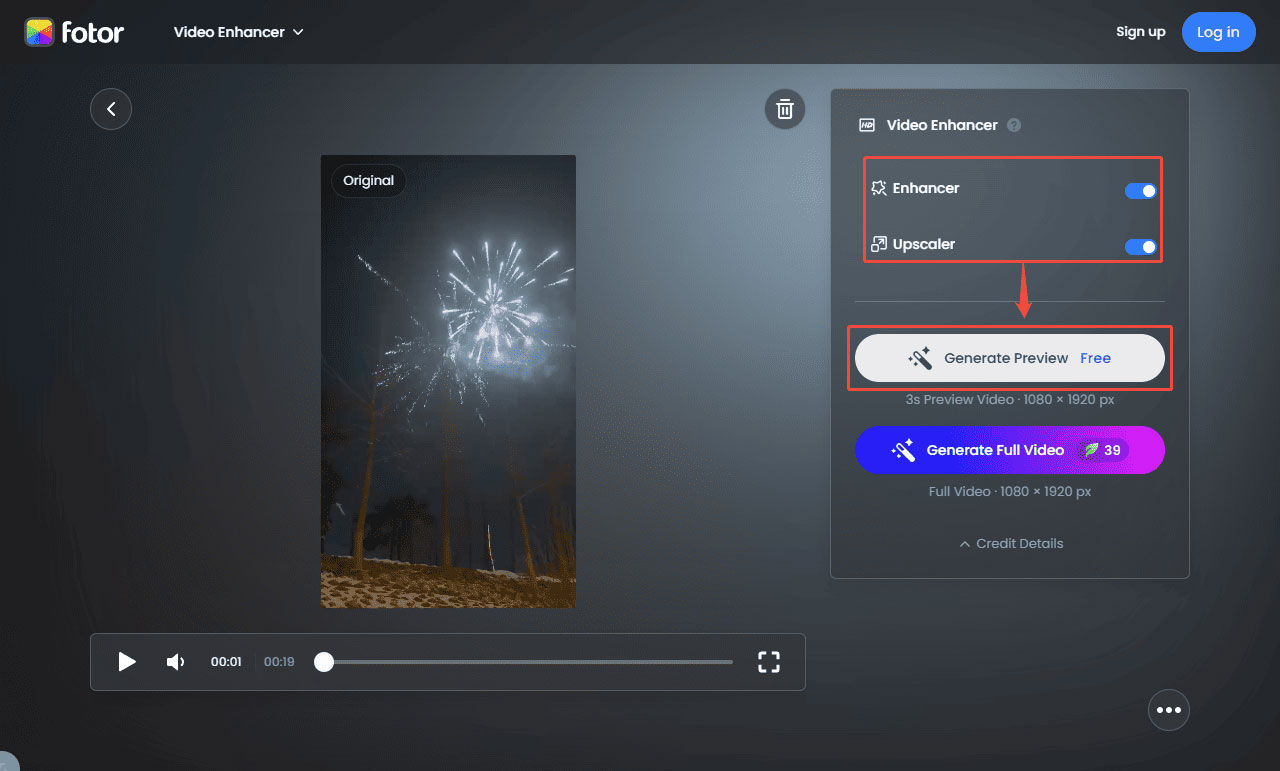
Click the Enhancer and Upscaler button on the interface. You can click Generate Preview to see the enhanced video.
Step 4: Export the Final Video
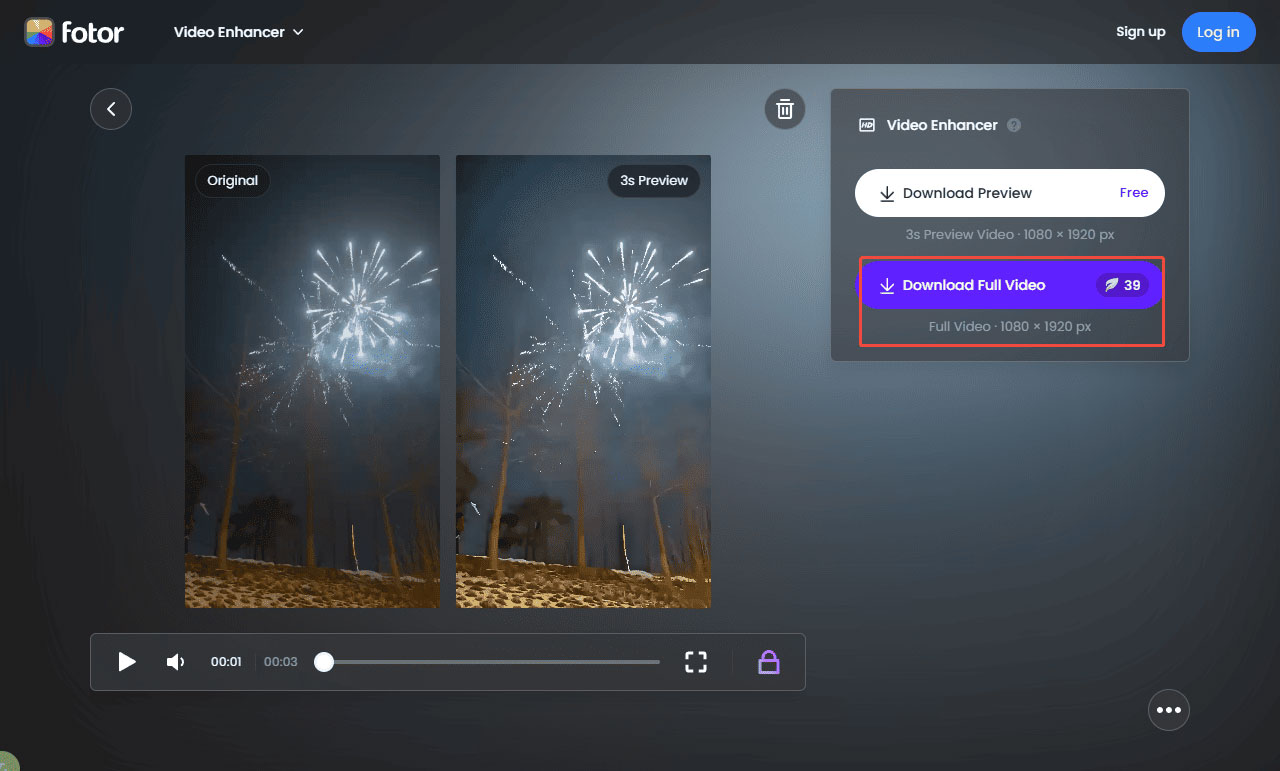
Click Download Full Video to save the enhanced video to your computer if you are satisfied with it.
Method 3: AVCLabs Video Enhancer
AVCLabs Video Enhancer is a professional video enhancer available for both Windows and Mac users. It comes equipped with a suite of editing tools, such as increasing video resolution, upscaling footage to 8k, fixing blurry video and shaky footage, adding blur to objects, and more. Powered by AI, all of these features can be completed with a few clicks.
In addition to its enhancement capabilities, AVCLabs also supports batch processing, allowing users to improve multiple CCTV clips at once. Its built-in stabilization, denoising, and color correction features further contribute to restoring the clarity and visual accuracy of CCTV footage.
Here are the concrete steps on how to enhance CCTV video quality using AVCLabs Video Enhancer.
Step 1: Download and Install
Go to the official website of AVCLabs Video Enhancer to download. Then, follow the on-screen instructions to complete the installation.
Step 2: Import Your Video
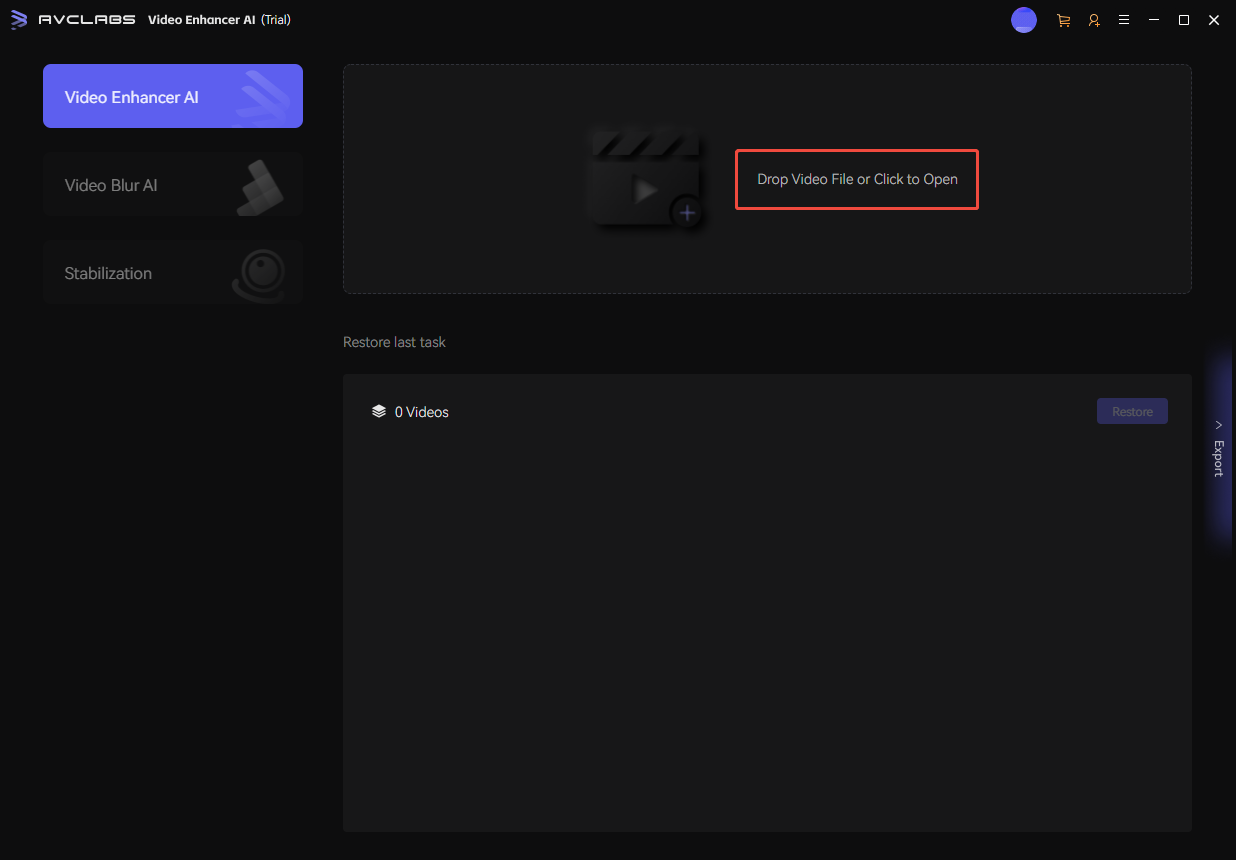
Open AVCLabs Video Enhancer and click the Import icon to upload your videos.
Step 3: Modify the Enhancement Settings
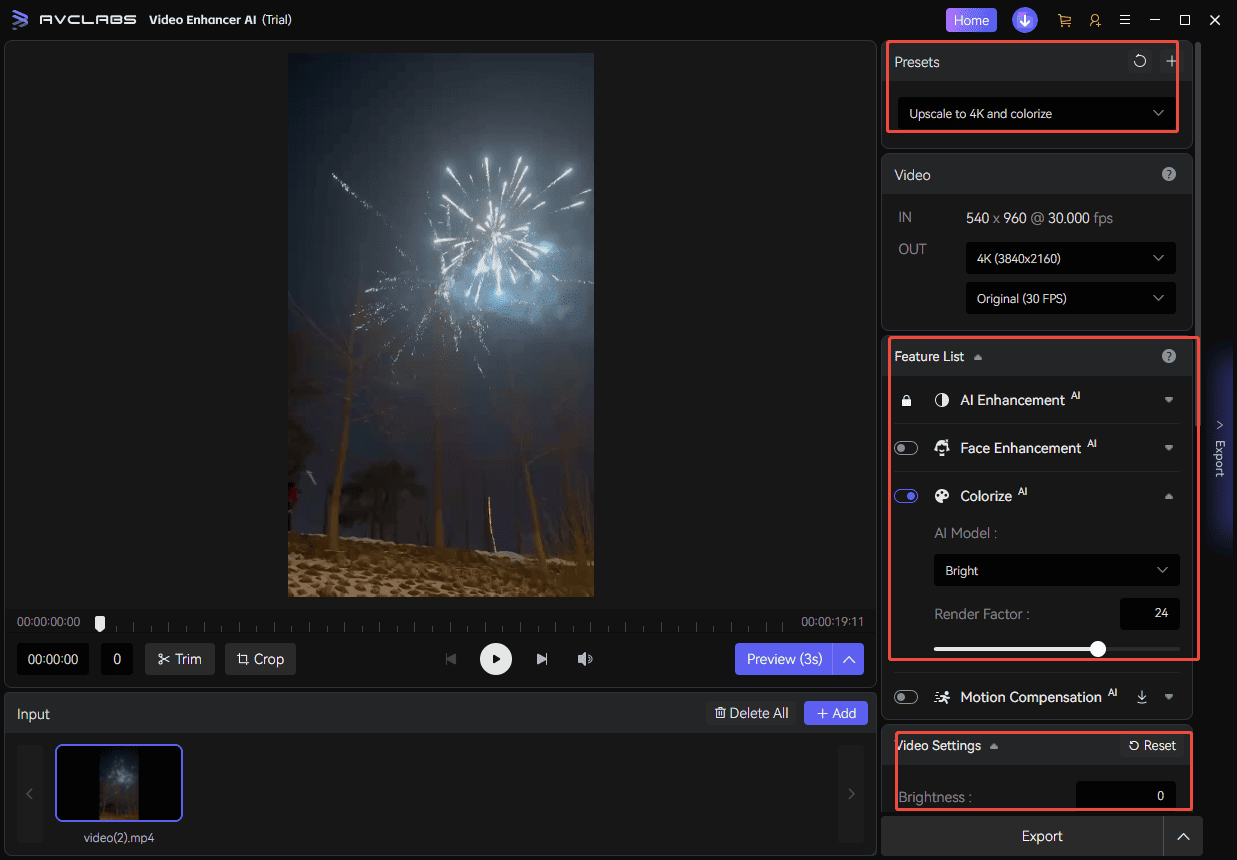
Select the appropriate video presets, enhancement model, and color adjustments on the right panel.
Step 4: Export the Final Video
Click Preview the watch the enhanced video. Then, click Export at the bottom of the interface to download it.
Conclusion
It is easy to enhance CCTV video quality with the 3 video enhancers mentioned above. Each tool allows you to process footage with just a few clicks, making it simple for beginners and professionals. Select the desired tool that best fits your needs and transform raw CCTV footage into clearer and more reliable video. Hope this post provides the guidance you need.
User Comments :