

Who is Wednesday Addams
Wednesday Addams is the protagonist of the Netflix series Wednesday. Adapted from the Addams Family comics, the show achieved massive success after its first season aired, with the lead character, Wednesday Addams, capturing the hearts of countless viewers.
Wednesday is often depicted as a gloomy, emotionally introverted child with a fascination for horror, characterized by her pale skin and signature black twin ponytails. As Wednesday’s popularity soared, many influencers began emulating her makeup and fashion style. Unlike traditional heavy goth makeup, Wednesday’s style leans toward a softer goth aesthetic—preserving an air of mystery while modernizing it for everyday wear.
Why Use a Wednesday Addams Filter
Using a Wednesday Addams filter will give your creative work a distinct gothic look, enabling you to create one-of-a-kind artworks that reflect your individual style. Adding a Wednesday filter to images can create dark-themed visuals, making your social media feed stand out and driving more engagement. Additionally, Wednesday Addams filters can also be used for dark-themed promotional campaigns, art projects, etc.
Seeking methods to transform your pictures with a Wednesday Addams filter? The content below has what you want. Keep reading.
How to Add a Wednesday Addams Filter to a Photo
Here are three methods to add a Wednesday Addams filter to a photo.
Option 1. Use OpenArt
OpenArt is an online AI-powered tool that can transform your pictures into Wednesday Addams-style efficiently. Use its AI filters to experiment with various styles and effects, which can enhance or completely transform the mood of your images. Plus, OpenArt features an intuitive user interface, suitable for beginners.
Follow the instructions below to apply a Wednesday Addams filter to your picture.
1. Access OpenArt’s Wednesday Addams Filter
Visit https://openart.ai/features/wednesday-addams-filter
2. Upload Your Picture
Click the Drop files here area to upload the picture you want to transform.
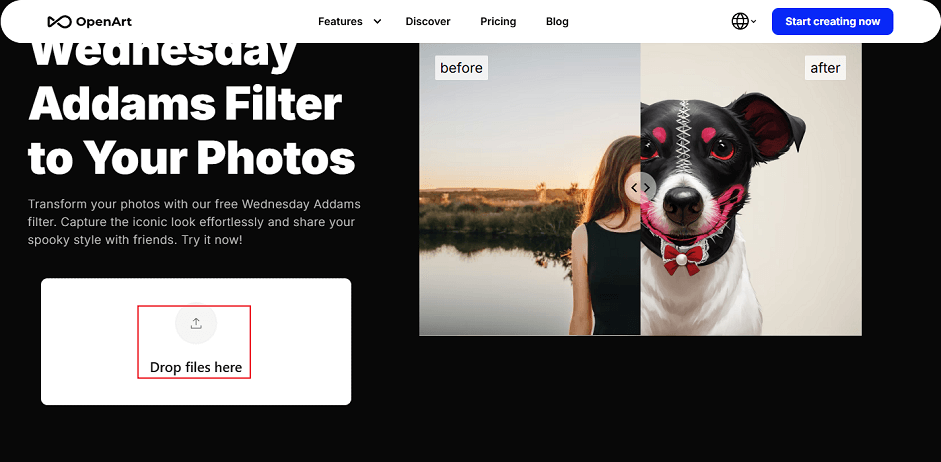
3. Apply the Filter
After the picture uploading process completes, the Wednesday Addams filter will be selected automatically. Click Create to start generating.
4. Download the Photo
The generated picture will be listed in the right section. Hover the mouse cursor on the photo until the Download icon appears; click it to save the photo.
Option 2. Use Media.io
Media.io is a professional online tool that is powered by AI for image/video creation. It can convert your pictures to Wednesday Addams-style with precise face makeup and hairstyle in no time. You can also adjust the makeup intensity and hair details based on your needs. In addition, Media.io is easy to use and requires no skills. All you have to do is upload your picture and wait for the process to be done.
1. Go to Media.io’s Wednesday Addams Generator
Visit https://www.media.io/ai/image-to-image?exploreId=1348&iti_tab=mai_image2image_refer
2. Upload Your Photo
Delete the sample photo. Then, click the Drag File Here or Click To Upload option to upload the target photo.
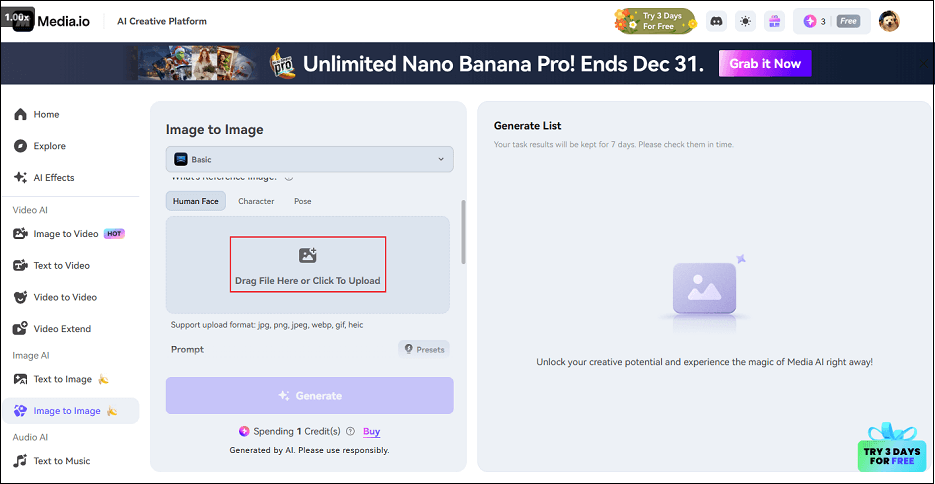
3. Generate the Picture in Wednesday Addams Style
Click the Generate option to apply the Wednesday Addams filter to the photo.
4. Download the Photo
When the process is done, click the Download button to save the photo.
Option 3. Use MyShell
MyShell is also an online AI tool that offers a Wednesday Addams filter. It is user-friendly and features a great performance, transforming your pictures into another style in seconds. Just follow the tutorials below.
1. Go to MyShell’s Wednesday Addams Filter
Visit https://art.myshell.ai/cosplay/wednesday-style-filter
2. Upload Your Photo
Click the UPLOAD IMAGE OR DRAG & DROP option to import the target picture.
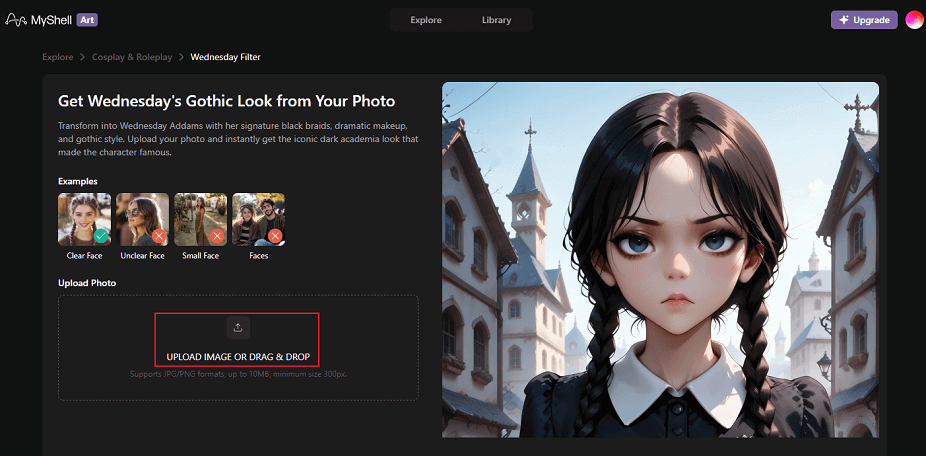
3. Start Generating the Photo
Click the Generate option to add the filter to your photo.
4. Download the Picture
When the generating process completes, click the Download button to save the picture.
MiniTool MovieMakerClick to Download100%Clean & Safe

In Summary
This post provides three robust and powerful tools to help you apply a Wednesday Addams filter to your photo. With them, you can transform yourself into Wednesday Addams with ease. Try the tools above and start your journey!
User Comments :