

Before we dive into how to add bokeh effects to photos, let’s have a general understanding of what the bokeh effect is.
What Is a Bokeh Effect
Bokeh refers to the soft, blurred effect in the out-of-focus areas of a photograph, particularly noticeable in bright background highlights. It transforms the background into soft circular or polygonal light spots, thereby enhancing the photo’s dreamlike quality. This effect is primarily used to make the subject clearer and more prominent while adding artistic appeal.
Soft, creamy bokeh creates a peaceful, dreamlike, or ethereal ambiance, and light sources convert into intriguing bokeh spheres, giving the scene a magical feel. In addition, bokeh effects can soften and blur cluttered or distracting background features in a picture, putting the subject front and center.
Want to add bokeh effects to photos? The good news is, you don’t need an expensive camera or professional photography skills to achieve a bokeh effect in your photos. Read on for more.
![How to Add Pop Up Effects in Video [Text/Stickers/Images]: 3 Ways](https://images.minitool.com/moviemaker.minitool.com/images/uploads/2025/12/pop-up-effects-in-video-thumbnail.png)
How to Add Bokeh Effects to Photos
Here are two reliable methods to add a bokeh effect to your pictures. Read on.
Method 1. Use Pixlr
Pixlr is a versatile online photo editor that offers quick image editing, allowing you to add a bokeh effect to photos with ease. It has an intuitive interface, which is good for both beginners and professionals. In addition, Pixlr is powered by AI, empowering the image editing process even more efficiently.
Here’s how to add a bokeh effect to a photo using Pixlr.
1. Access Pixlr’s Official Website
Visit https://pixlr.com/express/?tool=filter.
2. Upload Your Image
Click the Open Image button to import your picture.

3. Add a Bokeh Effect to the Photo
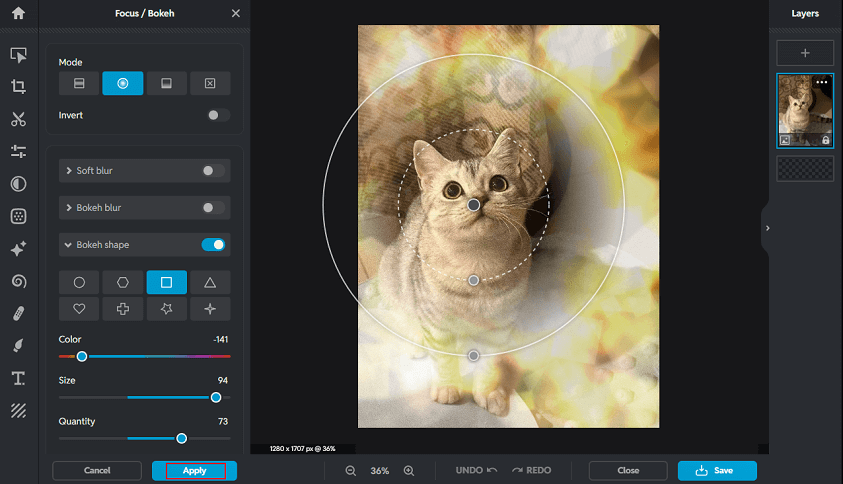
Choose the Focus/Bokeh option and enable the Bokeh shape option. You can choose a bokeh mode and adjust the bokeh shape, color, size, etc., based on your needs. Then, click Apply.
4. Save the Image
Click the Save button at the bottom right, choose an output image format, and click Save as.
Method 2. Use BeFunky
BeFunky is an easy-to-use and expert browser-based photo editing tool that offers multiple effects, like bokeh, grunge, scratches, metal, and more. Plus, it offers photo editing, graphic design, and collage creation tools that simplify complex tasks through an intuitive interface, templates, and AI features. Suitable for users ranging from beginners to professionals, it helps them create visual content for multiple purposes. Just follow the instructions below.
1. Access BeFunky’s Textures Section
Visit https://www.befunky.com/create/textures/.
2. Upload Your Image
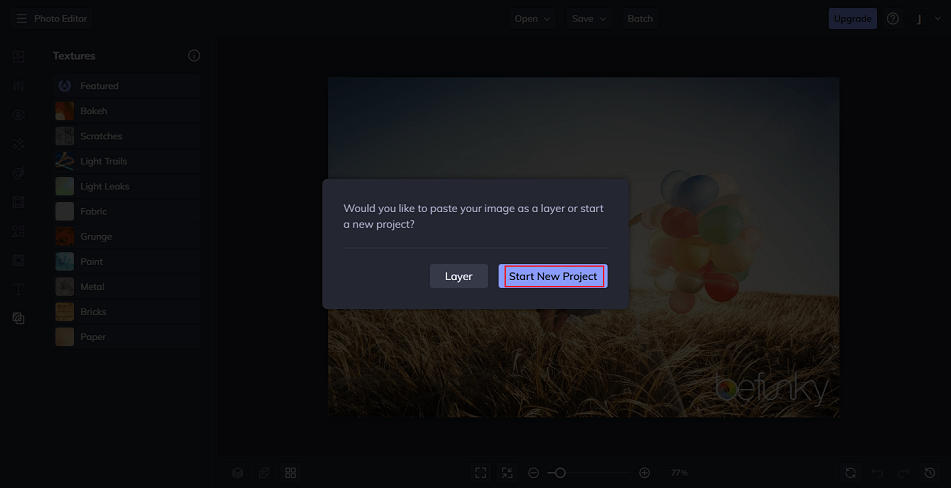
Drag and drop your image to the interface and click Start New Project.
3. Add a Bokeh Effect to the Photo
Choose Bokeh in the left menu.
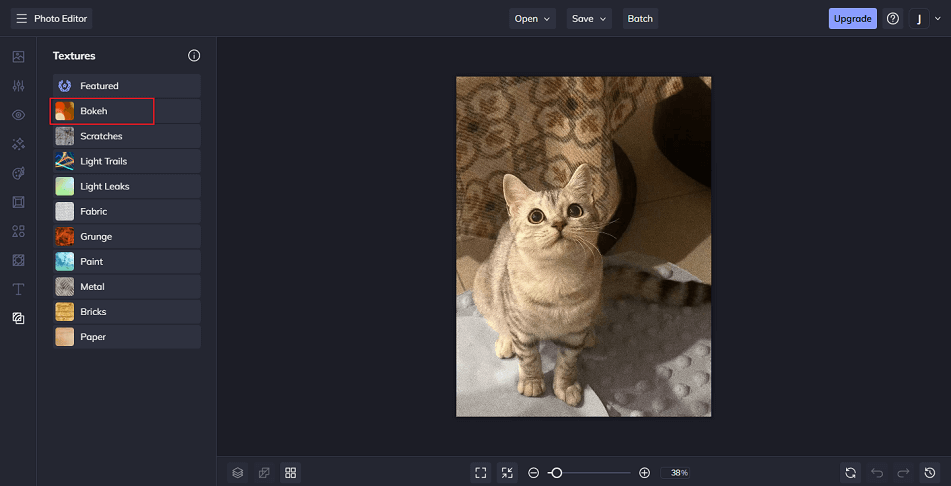
Choose the preferred bokeh effect, click the Settings icon, and adjust the effect parameter according to your needs.
4. Save the Image
Click the Save option at the top. Then, choose where you want to save the image.
All finished! With the two methods above, you can add a bokeh effect to a photo with ease.
MiniTool MovieMakerClick to Download100%Clean & Safe

In Summary
To add bokeh effects to photos, this article recommends two reliable and expert tools. They are all easy to use and enable you to add effects to pictures with no effort. Choose your preferred one and start your creation!
User Comments :