

GIFs are widely used in messaging, social media comments, product demonstrations, and web design. It’s easy to save GIFs from websites or chats. When chatting with friends, I frequently send GIFs to express my ideas and feelings, because the moving visuals are more persuasive than text. Of course, the combination of GIFs and text should be the most effective communication. That’s why a GIF caption maker is essential.
Adding captions to a GIF means conveying the emotion and tone with visuals while using clear words to provide context, which effectively creates a richer and more expressive way to connect.
In this post, I’ll share five best GIF caption makers to add creative text overlays to animations, based on my experience.
Best GIF Caption Maker for Windows
MiniTool MovieMaker is an easy-to-use video editor, and I’ve created numerous videos using the software. Its simple interface impressed me. While it is primarily designed for editing and creating videos, I also found that it can serve as a GIF maker and editor. It allows me to create animated GIFs from common video files and vice versa. Additionally, most of the editing features of MiniTool MovieMaker can be applied to GIFs.
First, MiniTool MovieMaker allows for both static and animated captions. I also love its stylish bubble designs to spice up static text, and meanwhile, these bubbles can effectively highlight the text on the GIF.
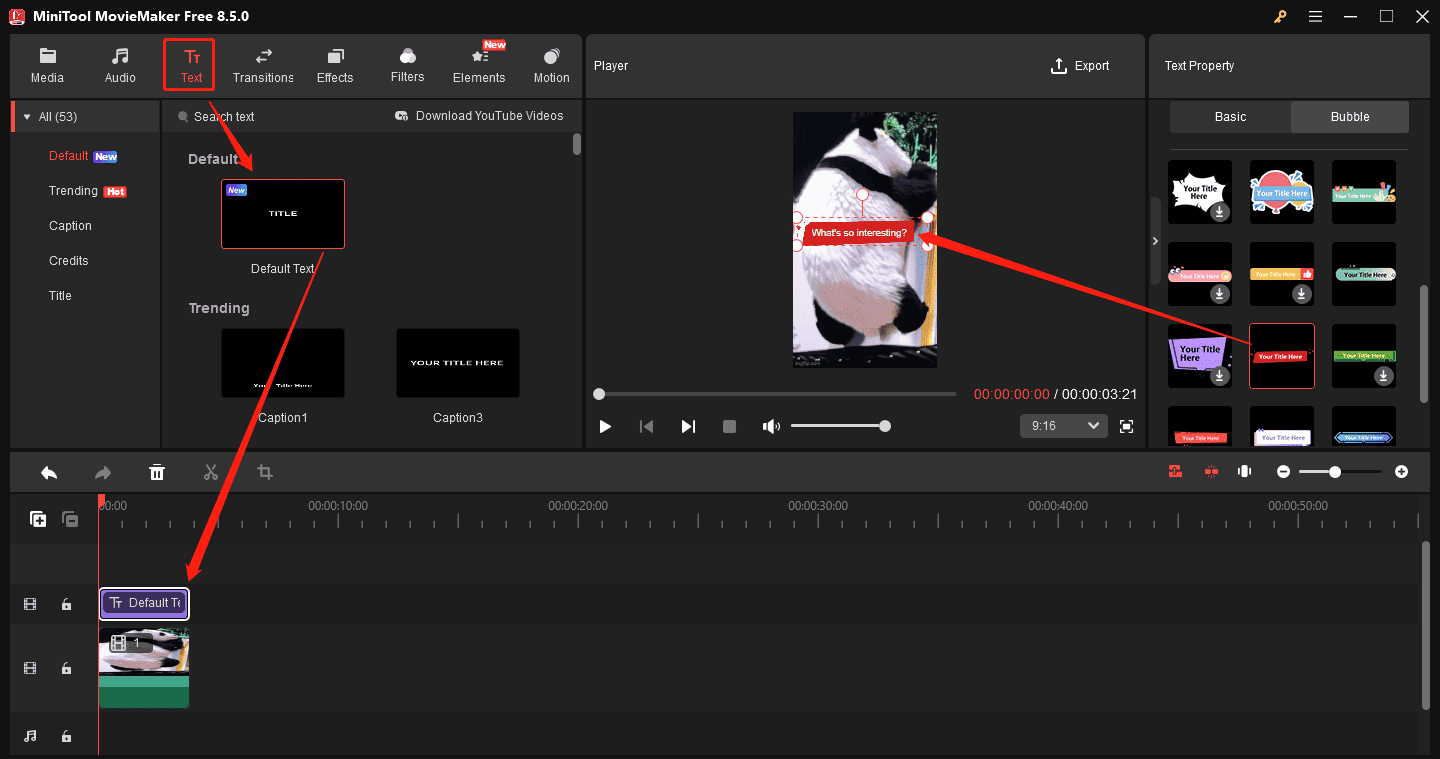
As for animated captions, MiniTool MovieMaker offers a wider range of templates. Before downloading one, I always put the mouse cursor over the target text template for a quick preview. Besides, I found that most of the caption presets have a typewriter-like effect, and others also come with dynamic effects. These text animations can help create more engaging GIFs. Sometimes, when I want to guide the viewer’s attention to the visual animation, I’ll just use the static text template.
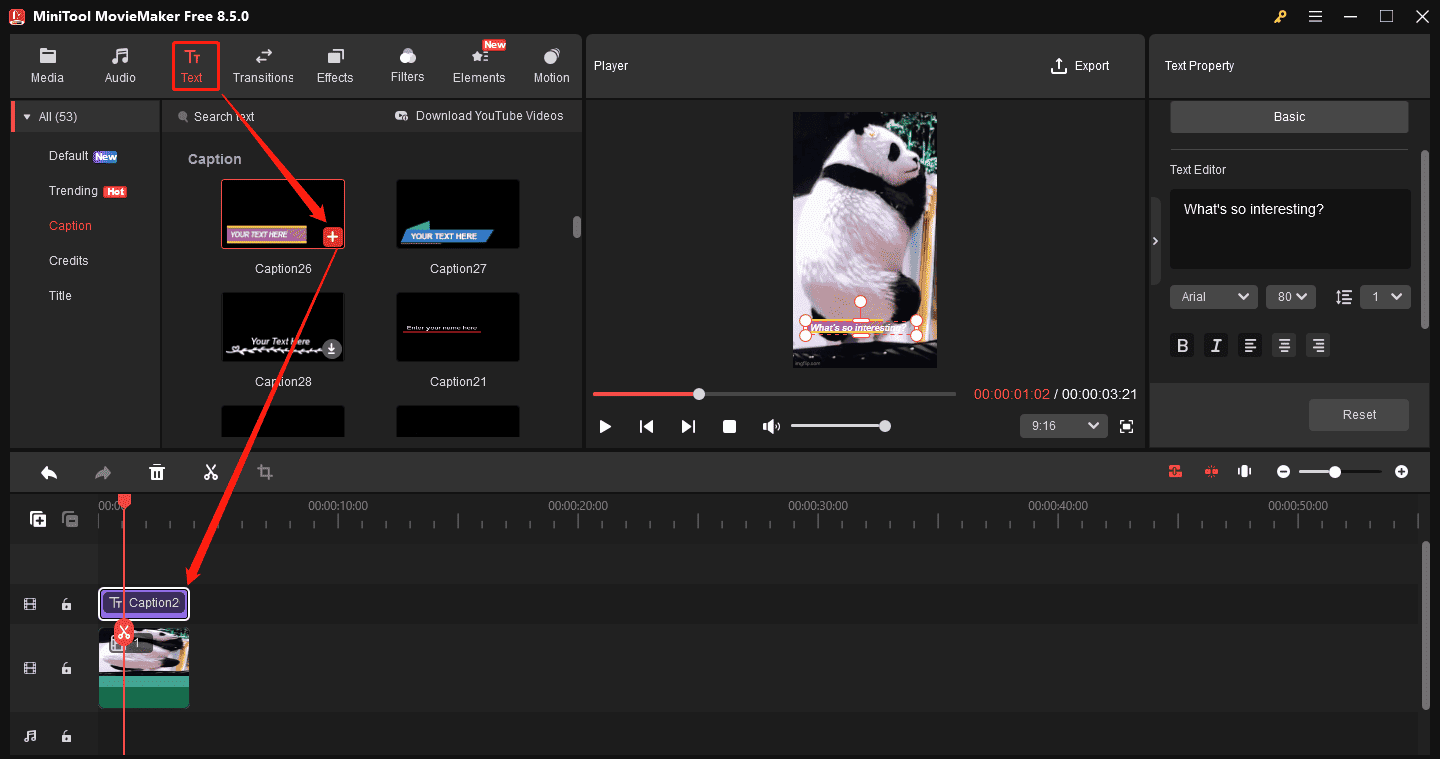
Therefore, I would say that MiniTool MovieMaker is an excellent GIF caption maker. The software also lets me change the text fonts, size, line spacing, alignment, bold, italic, text color, background color, and opacity for maximum text customization.
Personally, the best part of MiniTool MovieMaker is that it’s free to add captions to GIFs and won’t leave a watermark on the final GIF. What’s more, I also found MiniTool MovieMaker can trim, crop, and rotate GIFs, and merge multiple GIFs into one.
Top 4 Online GIF Caption Makers
In addition to the desktop GIF caption maker, I also discovered that there are many reliable online tools for inserting text into GIFs. The following four tools are worth trying.
GIFGIFs
GIFGIFs is a free GIF animation website that allows users to download and share GIFs on Twitter, Facebook, WhatsApp, Telegram, Discord, and Reddit. The platform categorizes GIFs into different types, such as animals, anime, holiday, hobbies, and entertainment, allowing me to browse for the target GIF easily.
When I browsed through the website, I noticed it also offers common GIF tools, and adding text is one of them. First, I need to upload a GIF from my laptop or load one from a URL. Next, I can enter my desired words in the corresponding box, change the font, adjust the size, rotate the text, alter the text color, and add outlines.
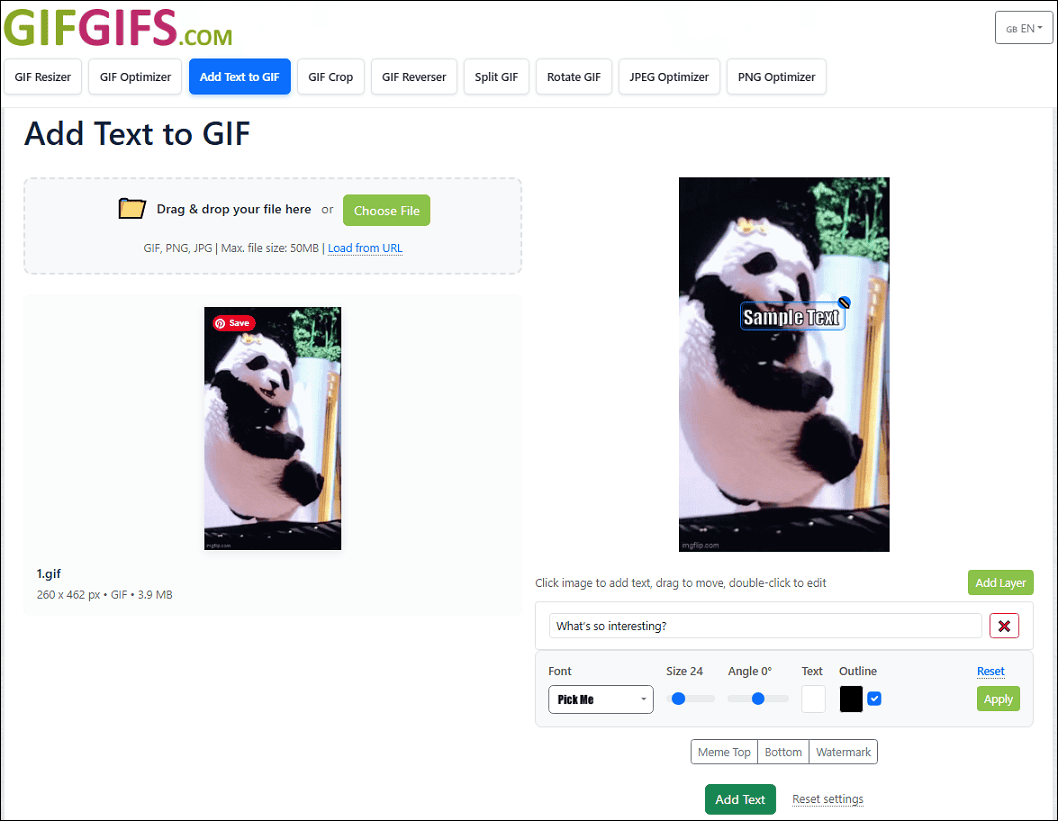
This online GIF caption maker requires no registration and doesn’t watermark the final result. However, I found GIFGIFs can’t instantly display the latest update after making some changes. I had to click the Apply option to view the result GIF, which is not convenient.
Ezgif
When it comes to editing GIFs, I must mention Ezgif, an online free GIF editor and maker. Undoubtedly, it enables me to add caption to GIF in the browser. Unlike the above two tools, Ezgif allows me to add and edit the text for a GIF frame by frame. While this ensures precise control over the text, it also takes more time to complete the task.
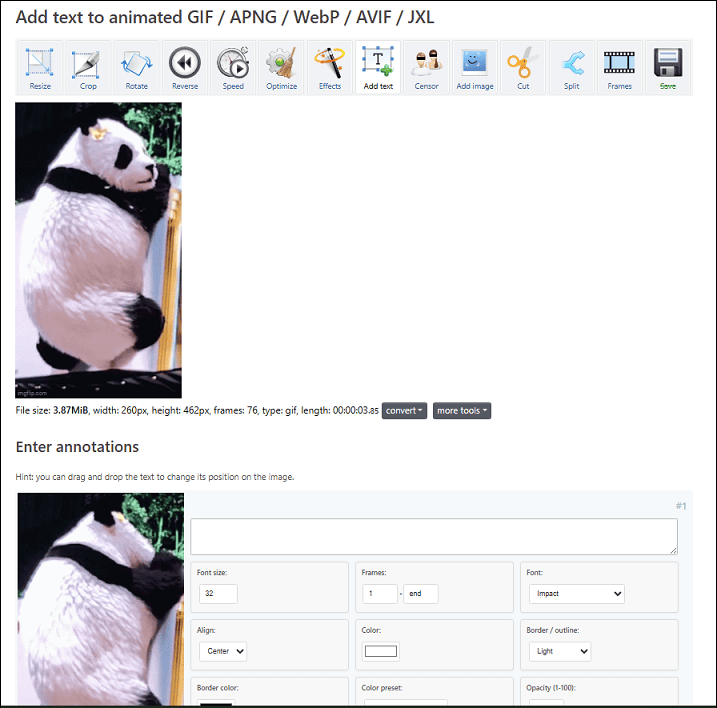
What’s more, Ezgif lets me modify the font, size, alignment, color, and position, and add borders to customize the text. The platform also provides tools for optimizing, resizing, cropping, and cutting GIFs.
Clideo
Clideo provides a variety of tools for editing videos, GIFs, and images. As a simple GIF editor, it lets me add text, crop, rotate, flip, and trim GIFs, and add stickers or emojis to the GIF.
There was a time when I added captions to a GIF using Clideo, and I discovered that all of the text styles have no dynamic effects. Of course, the service also allows me to customize the text by selecting the color, font, and size, adjusting line height and letter spacing, or adding a background to the text.
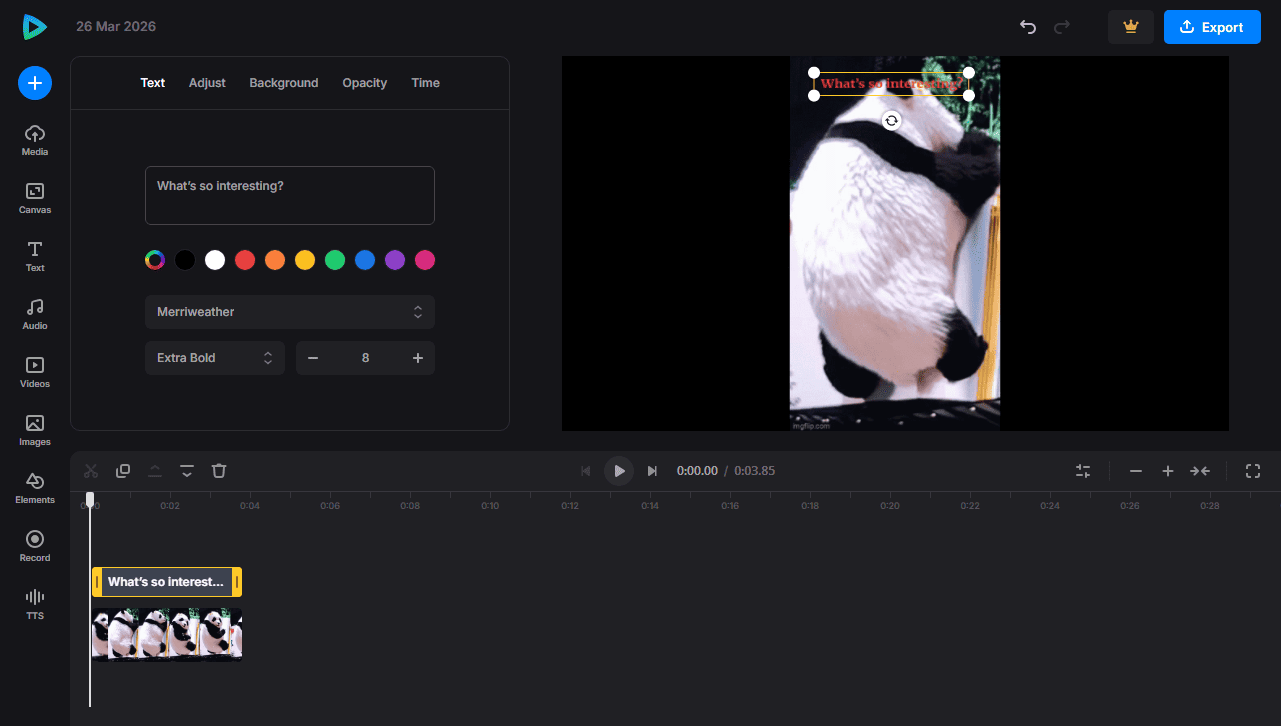
However, the final GIF will be watermarked. If I want to remove the watermark, I have to upgrade to Clide Pro.
Canva
Canva is a versatile graphic design platform that allows users to create professional-quality visual content, such as videos, images, GIFs, presentations, and social media posts. It also features a wide range of text presets to add creative captions to the media. However, not all of the templates are free to use, and some require a Pro account.
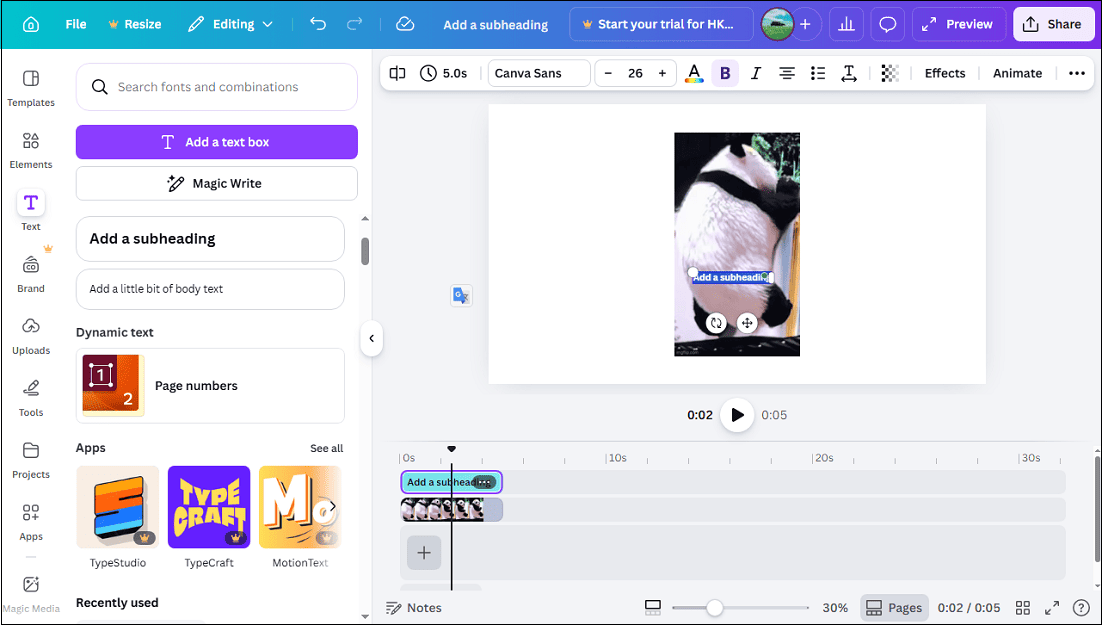
Personally, the biggest feature of this online GIF caption maker lies in its advanced text settings. In addition to the common text font, size, color, bold, and alignment, it also supports transparency, offers various text effects, and provides multiple animation effects.
Conclusion
That’s all about the five GIF caption makers. The desktop application – MiniTool MovieMaker features rich text presets and stable performance. While online tools offer quick access, they need an internet connection to work, and a poor network may result in long loading times.
Finally, if you encounter problems while using MiniTool MovieMaker, send an email to [email protected] for help.
About The Author

Position: Columnist
Cora is a tech writer specializing in digital media workflows, with over six years of hands-on experience in video post-production, media transcoding, and screen capture. Her writing is always clear and practical. Cora also produces in-depth software reviews for users across skill levels to help them find the right tool and enjoy video editing.
User Comments :